
SEO crawl budget is the number of URLs Googlebot crawls on a site within a given timeframe. Two factors set the budget: crawl capacity limit, the load a server can handle without trouble, and crawl demand, driven by the popularity, freshness, and inventory of URLs on the site. Crawl budget differs from the older crawl rate limit, a manual setting Google has removed from Search Console, and crawling stays separate from indexing: crawling means finding and fetching URLs, indexing means storing pages for potential ranking, so a page can be crawled yet never indexed.
The weight of crawl budget for SEO comes down to visibility. Pages that go uncrawled cannot be indexed, and unindexed pages cannot rank in search results. Crawl budget wasted on low-value URLs, from duplicates to broken links, pulls attention away from the pages that drive traffic. Crawl-budget optimization matters most for very large websites, frequently updated sites, and ecommerce platforms with heavy faceted navigation, while smaller sites, whose pages get crawled fast, rarely need active management.
Auditing crawl budget runs on the Google Search Console Crawl Stats report and server log analysis. The Crawl Stats report shows total crawl requests, response codes, and crawl purpose, while server logs expose Googlebot's actual activity, crawl frequency, and crawl waste. Optimizing crawl budget follows six steps: improve internal linking and fix orphan pages, keep XML sitemaps accurate, block low-value parameter URLs, consolidate duplicates with canonical tags, fix crawl errors, and raise server speed. Complex sites and persistent crawl waste justify expert help, and SEO agencies rank fixes by impact and effort before implementing changes across the technical stack. Crawl budget touches ecommerce through faceted URLs, publishing through timely content discovery, and site migrations through redirect maps and crawl spikes. Ongoing monitoring through Search Console trends and log reviews keeps the strategy working, so Google keeps finding, crawling, and indexing the pages that matter.
What Is Crawl Budget in SEO?
Crawl budget in SEO is the number of URLs or pages Googlebot crawls on a website within a given timeframe. Two factors determine the budget: the crawl capacity limit, which caps how much a site can be crawled without overloading its servers, and crawl demand, which reflects how much Google wants to crawl based on content freshness, popularity, and URL inventory. Together the two inputs define the set of URLs Google can and wants to crawl.
Crawl budget matters because crawling and indexing are different stages. Crawling covers the finding and fetching of pages, while indexing stores the fetched pages and makes them eligible for search results. A page can be crawled but left out of the index when it misses Google's inclusion criteria, which is why crawl budget management matters most for large websites with big URL inventories.
How Does Crawl Budget Differ From Crawl Rate Limit and Crawl Demand?
Crawl budget differs from the crawl rate limit in that the budget is computed from two live inputs, crawl capacity limit and crawl demand, while the crawl rate limit was a legacy Search Console setting that let webmasters throttle Googlebot manually. Google removed the manual setting in favor of the current capacity-and-demand system.
The crawl capacity limit represents how much the server can handle without overload, and Google adjusts it automatically from server responsiveness and error signals like 5xx responses. Crawl demand follows the site's popularity, content freshness, and URL inventory. The two inputs together set the number of URLs Googlebot crawls within a timeframe, replacing the simpler crawl rate limit of the past.
How Does Crawling Differ From Indexing?
Crawling differs from indexing as discovery differs from storage. Crawling is the finding and retrieval of web pages by Googlebot, which visits URLs, downloads page content, and analyzes resources like HTML, JavaScript, and CSS, moving through the web by links and sitemaps. Indexing stores and evaluates the crawled pages for inclusion in Google's searchable database: once a page is crawled, its content gets analyzed to decide whether it enters the index, where it can appear in search results and compete for rankings.
A page can be crawled but not indexed when it misses the bar on content quality, relevance, or guideline compliance. Duplicate content, thin content, and noindex directives all keep crawled pages out of the index. The split between crawling and indexing matters for SEO because pages need optimizing for discovery and for inclusion, not just one of the two.
How Does Crawl Budget Work?
Crawl budget works through two components: crawl capacity limit and crawl demand. Google's documentation "Optimize your crawl budget," published by Google Search Central, defines a site's crawl budget as the set of URLs Google can and wants to crawl, set by the two factors together. The crawl capacity limit is the maximum rate at which Google can safely access a website without hurting server performance, while crawl demand reflects Google's interest in the site's content based on freshness and popularity.
The capacity-and-demand model adjusts the crawl budget dynamically. A server that handles more requests, paired with content worth fetching, earns a larger crawl budget; slow response times or stale content shrink it. Server performance and content quality therefore both feed the budget, and the crawl capacity limit forms the first half of the equation.
What Is Google’s Crawl Capacity Limit?
Google's crawl capacity limit is the maximum number of pages Googlebot can crawl on a website without hurting server performance. Host load tolerance, server responsiveness, and response time set the limit. When Googlebot hits 5xx server errors or slow responses, it lowers the crawl rate automatically to protect server stability. Webmasters once adjusted crawling speed manually through the Search Console crawl-rate setting, but Google removed the option in favor of automatic capacity detection. The crawl capacity limit keeps Googlebot from overwhelming server resources, protecting the website and its users at once.
The crawl capacity limit forms one half of the crawl budget equation, with crawl demand supplying the other half.
What Is Google’s Crawl Demand?
Google's crawl demand is a measure of how much Google wants to crawl a site's URLs. Page popularity, content freshness, and the site's URL inventory drive the demand. Pages with high popularity, marked by plentiful inbound links, get crawled more because the links signal importance to Google. Content freshness pulls its own weight: pages updated on a steady rhythm get re-crawled so the search index stays current. The total number of URLs on a site matters too, since larger sites generate more demand. A site owner who reads those factors can shape content to match Google's crawling preferences.
What is the importance of Crawl Budget for SEO?
The importance of crawl budget for SEO is that it decides which pages Googlebot crawls and indexes. Pages that go uncrawled stay unindexed and cannot appear in search results, which caps organic visibility. Crawl budget burned on low-value URLs, from duplicate content and parameter-heavy pages to broken links, leaves important pages neglected and traffic on the table. Managed well, the crawl budget gets the pages that matter found and indexed without delay.
Better crawl efficiency translates into faster indexing and earlier ranking opportunities. A Botify analysis of 413 million pages and 6 billion Googlebot requests, reported by Search Engine Land, found Google fails to crawl roughly half the content on a typical enterprise website, so sites that cut crawl waste see new content picked up sooner, and content found at the right moment captures more organic traffic. Steering the budget toward high-priority pages keeps a site's most important content in front of search engines, supporting sustained traffic growth and a competitive position in the rankings.
Which Websites Need Crawl-Budget Optimization?
The websites that need crawl-budget optimization are large sites, frequently updated sites, and ecommerce platforms with faceted URLs. Sites past one million pages face the clearest need, since Googlebot cannot cover so much inventory without direction. Sites above 10,000 pages that update content daily gain from crawl-budget management as well, because frequent updates raise crawl demand and important pages must be indexed without delay; the one-million and ten-thousand page marks are the size thresholds Google's own crawl-budget guidance names for sites that should manage crawling actively. Faceted ecommerce navigation multiplies low-value URLs and pushes such sites into the same category.
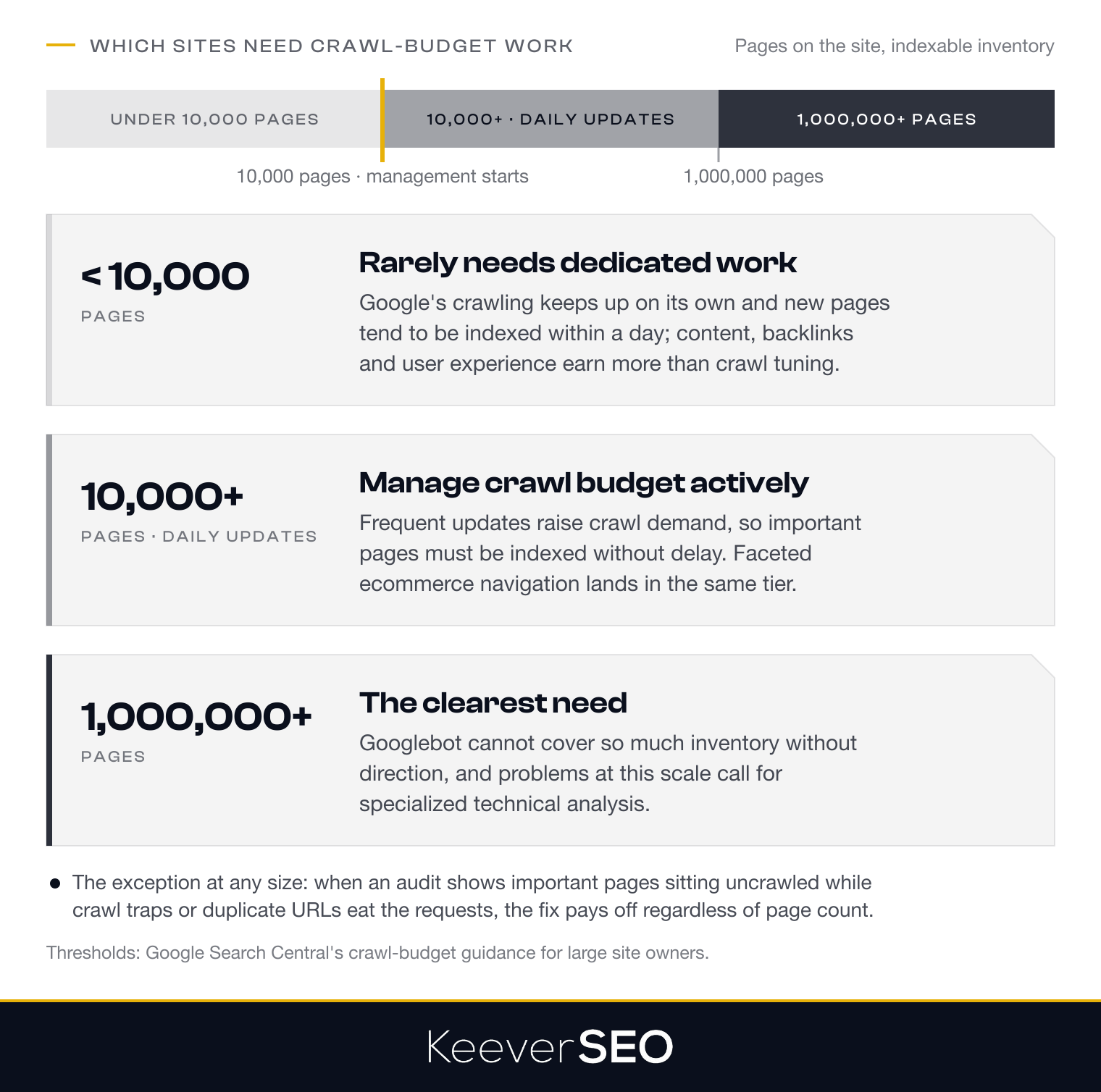
Small and medium websites rarely need dedicated crawl-budget work. Below roughly 10,000 pages, Google's crawling infrastructure keeps up on its own, and new pages tend to be indexed within a day. A smaller site earns more from content quality, backlinks, and user experience than from crawl-budget tuning.
The exception arrives when an audit shows important pages sitting uncrawled while low-value URLs eat crawl resources. Infinite crawl traps and duplicate-content problems produce exactly that pattern, and fixing them returns the crawl budget to the pages that deserve it.
How Can You Audit Crawl Budget?
You can audit crawl budget through two methods: the Search Console Crawl Stats report and server log file analysis. The two views together show how Googlebot treats the site and where optimization should start.
- Search Console Crawl Stats report: a high-level overview of crawling activity, covering total crawl requests, response codes, and trends over time, which surfaces accessibility issues and shows how Googlebot moves through the site.
- Server log file analysis: a detailed record of actual requests hitting the server, which verifies genuine Googlebot activity, segments crawled URLs, and spots crawl waste on low-value paths like parameter-heavy URLs or outdated content.
Auditing comes before optimizing because the audit shows where crawl budget currently goes, starting with what the Crawl Stats report reveals.
What Does the Crawl Stats Report Show in Google Search Console?
The Crawl Stats report in Google Search Console shows how Googlebot interacts with a website over a set period. The report covers the total number of crawl requests, which sizes the activity Googlebot dedicates to the site, and the host status, which reads server health and responsiveness. Over-time charts visualize crawling trends, exposing spikes and drops that deserve attention.
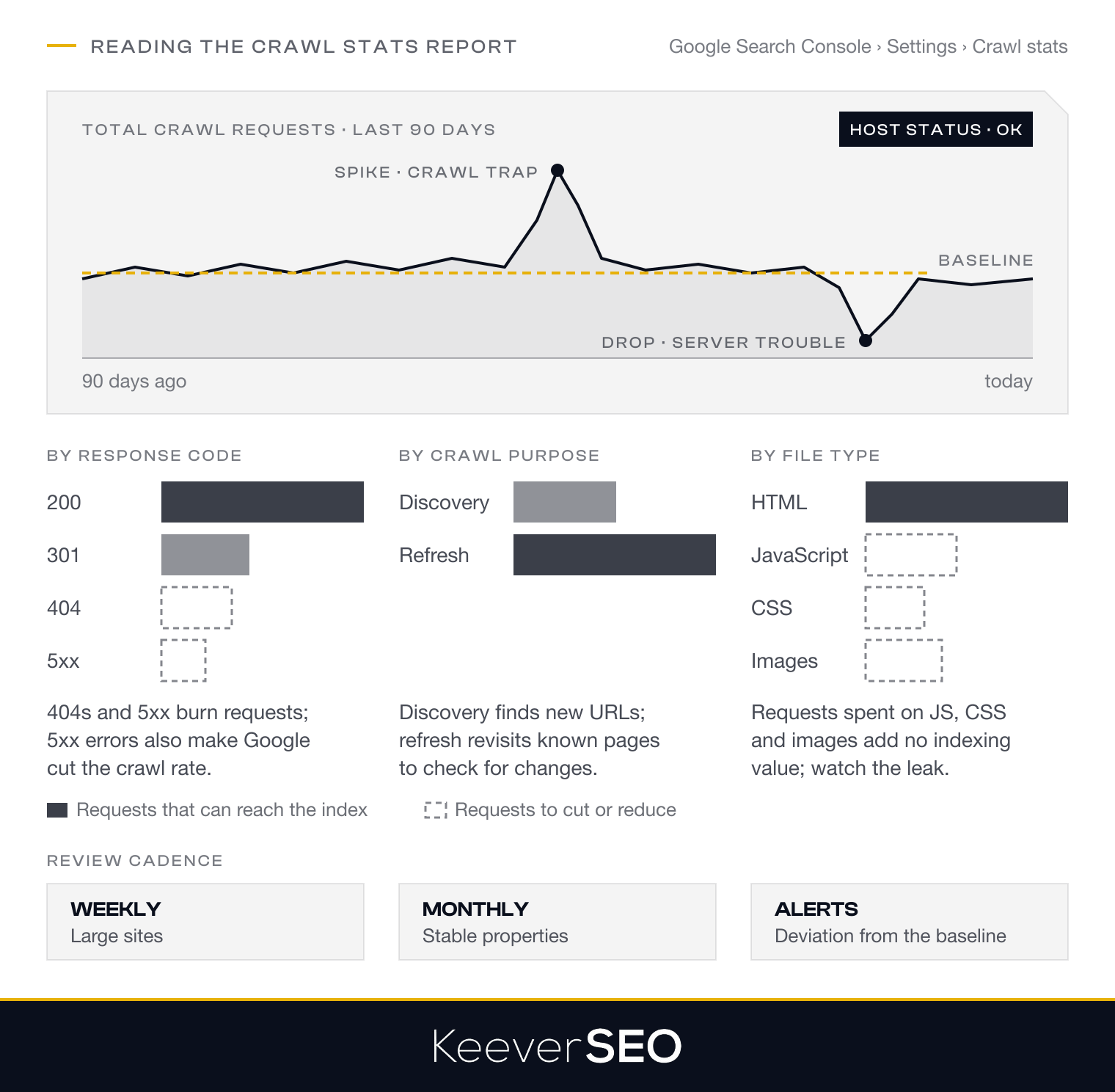
The report breaks requests down by response code, from 200 to 404 and 5xx, which supports diagnosing crawl errors and server issues. Requests split by purpose as well: discovery crawls find new or updated URLs, while refresh crawls revisit known pages for changes. A file-type breakdown shows whether Googlebot spends its requests on HTML pages, JavaScript, CSS, images, or other resources, which flags crawl budget leaking into file types that add no indexing value.
How Can Server Log Files Reveal Googlebot Crawl Behavior?
Server log files reveal Googlebot crawl behavior by recording every request made to a website. Logs confirm real Googlebot visits through user-agent strings and IP addresses checked against Google's official bot identifiers. Segmenting the crawled URLs shows which site sections Googlebot visits most and which it overlooks, and the same segmentation spots crawl waste on low-value paths, from parameter URLs and internal search results to redirect chains. Logs expose crawl frequency by site section too, showing whether priority pages get crawled enough or obsolete URLs soak up the requests. Findings from log analysis then drive the optimization decisions, from robots.txt blocks to internal-linking improvements.
How Can You Optimize Crawl Budget on Your Site?
You can optimize crawl budget on your site through six technical fixes that steer Googlebot away from low-value or duplicate content and toward the pages that earn rankings:
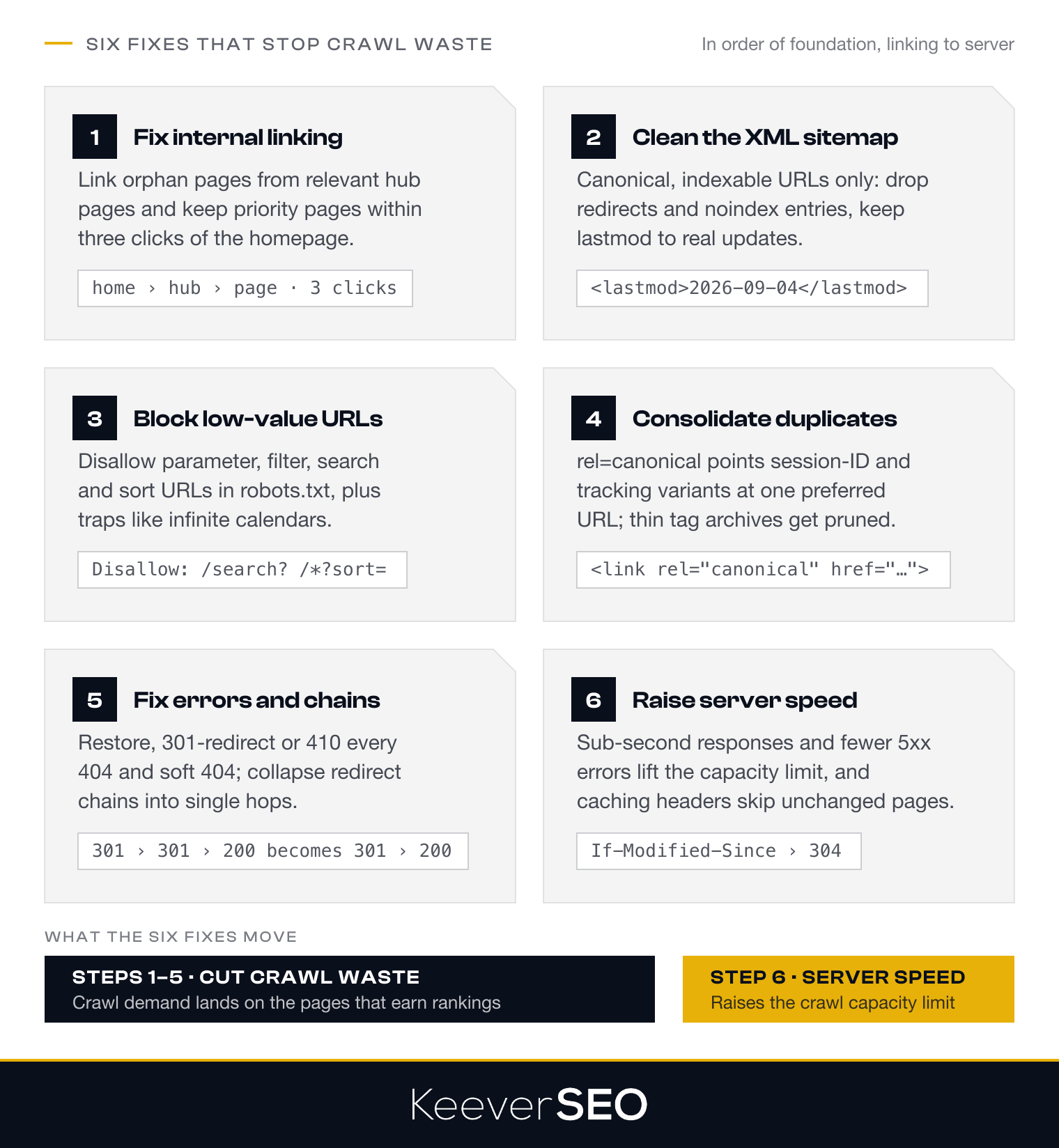
- Improve internal linking and fix orphan pages: strengthen internal links to priority pages and connect every page into the structure.
- Keep XML sitemaps accurate and focused on canonical URLs: include only canonical, indexable URLs and drop entries that are noindexed or redirected.
- Block low-value parameter, filter, and search URLs: disallow parameter and search URLs that add no value in robots.txt.
- Consolidate duplicate URLs with canonical tags: point duplicates at the preferred URL with rel=canonical.
- Fix crawl errors, broken links, and redirect chains: resolve 404s, collapse redirect chains, and return correct status codes.
- Improve server speed and reduce 5xx errors: faster responses and fewer errors raise the crawl capacity limit.
The six steps run in order of foundation, starting with internal linking.
1. Improve Internal Linking and Fix Orphan Pages
Improving internal linking and fixing orphan pages gives Googlebot clear paths to the pages that matter. Orphan pages, which no internal links reach, stay hard for Googlebot to find, so linking them from relevant category or hub pages restores their visibility and crawlability.
Surfacing orphan pages: run a full audit to identify pages with no internal links, using crawl tools or server logs, then wire them into the site's linking structure.
Strengthening internal links: link high-priority pages directly from other relevant pages, so important content sits within easy reach of every crawl path.
Reducing link depth: keep high-priority pages within three clicks of the homepage. A flatter architecture improves navigation for users and signals to search engines which pages count, putting the crawl budget where it belongs.
2. Keep XML Sitemaps Accurate and Focused on Canonical URLs
Keeping XML sitemaps accurate and focused on canonical URLs steers Googlebot straight to the pages worth indexing:
- Include only canonical URLs: every URL in the sitemap should be the preferred version for indexing, with non-canonical variations left out.
- Remove redirects and noindexed entries: URLs that redirect or carry noindex tags waste crawl requests without contributing to indexing.
- Maintain accurate lastmod values: the
<lastmod>tag should reflect the last meaningful update of the page, never an automatic date bump that tricks search engines into pointless recrawls.
A clean, focused XML sitemap guides Googlebot to high-value pages and keeps the important content first in line for indexing.
3. Block Low-Value Parameter, Filter, and Search URLs
Blocking low-value parameter, filter, and search URLs stops duplicates and thin pages from draining crawl resources:
- Robots.txt disallow rules: block paths that spawn endless URL combinations, disallowing patterns like /search? or /*?sort= so parameter-heavy URLs never enter the crawl queue.
- Parameter and facet handling: identify the parameters that generate duplicate content through log analysis, then block the non-canonical paths in robots.txt while canonical pages stay reachable.
- Internal search and sort URLs: block directories holding internal search results or sorting options, pairing robots.txt with noindex where both crawling and indexing need stopping.
- Crawl traps and infinite spaces: detect and block traps like infinite calendar pagination and session-ID URLs, which can exhaust a crawl budget and pull Googlebot off important pages.
Blocks placed on those patterns concentrate Googlebot's requests on indexable content that earns its crawl.
4. Consolidate Duplicate URLs With Canonical Tags
Consolidating duplicate URLs with canonical tags directs Googlebot's crawling toward one preferred version of each page. The rel=canonical tag tells search engines which URL leads among duplicates, so requests concentrate on the main URL instead of session-ID and tracking-parameter variants. Canonical tags stop the crawl budget from spreading across redundant URLs and keep Googlebot on the content with value.
Pruning near-duplicate and thin pages belongs to the same fix: auto-generated tag archives and filter combinations that add minimal value should be consolidated or removed, concentrating crawl attention on quality pages. The noindex and canonical directives split the work: noindex keeps a page out of the index, while canonical points indexing signals at an alternate URL. Used correctly, the two directives keep the crawl budget managed and the site's SEO sharp.
5. Fix Crawl Errors, Broken Links, and Redirect Chains
Fixing crawl errors, broken links, and redirect chains recovers crawl requests that low-value responses burn. Every 404, soft 404, and redirect chain consumes requests that indexable pages could use, so cleaning them up speeds the discovery of content that matters.
Start with the 404s and soft 404s: Google Search Console's Coverage and Page Indexing reports surface them, and each one gets restored, redirected with a 301 to a relevant page, or confirmed gone with a correct 404 or 410 status. Audit redirect chains next, collapsing multi-hop sequences into single 301 hops that point straight at the final URL. Update or remove broken internal and external links, which waste crawl requests and degrade the reading experience together. Close by checking that the server returns accurate HTTP status codes, 200 for live pages, 301 for permanent redirects, 404 for missing content, without soft 404s or false 200s muddying the signals. A systematic cleanup frees crawl budget, cuts server load, and keeps search engines on the pages that count.
6. Improve Server Speed and Reduce 5xx Errors
Improving server speed and reducing 5xx errors raises the crawl capacity limit directly. Faster responses let Googlebot crawl more pages per visit, with sub-second loads the working target, while slow pages burn crawl time. 5xx errors carry their own cost: they signal server trouble to Google and trigger crawl-rate reductions. HTTP caching signals, from Last-Modified to If-Modified-Since headers, add efficiency by letting Googlebot skip re-crawling unchanged content. Large or complex sites with persistent server issues tend to need expert hands for the server-level work, which raises the question of when to bring help in.
When Should You Get Help With a Crawl-Budget Audit?
You should get help with a crawl-budget audit when the site is large, technically complex, or stuck with persistent crawl waste. Sites past one million pages face problems that demand specialized technical analysis. Crawl waste that survives basic optimization signals hidden issues, from parameter explosion to server-configuration faults, that an external audit uncovers. Thin in-house technical capacity points the same way: a team without server-log analysis or technical implementation skills gains a full audit by partnering with our SEO company. When crawl inefficiency touches high-value pages, our specialist diagnosis and execution become a high-return investment.
Once expert help is on the table, the question becomes how a professional audit ranks the fixes.
How Can an SEO Audit Prioritize Crawl-Budget Fixes?
An SEO audit prioritizes crawl-budget fixes by ranking them on impact and effort. The work starts by identifying high-waste areas, from parameter traps to duplicate URLs, that consume crawl demand without returning traffic. Blocking low-value parameter URLs and fixing crawl errors on important pages outrank minor internal-linking tweaks. SEO Agency In USA runs the analysis on crawl data from Google Search Console and server logs, isolating the site sections that eat the most crawl budget for the least result.
The audit then maps each candidate fix against its expected impact on crawl efficiency and the technical effort required. High-priority fixes cover eliminating crawl traps, consolidating duplicate URLs with canonical tags, and removing redirect chains on high-authority pages. SEO Agency In USA weighs the volume of wasted crawl requests against the strategic importance of the affected pages, producing a sequenced action plan that attacks the biggest leaks first. With the roadmap set, implementation and validation follow.
How Can an SEO Agency Implement Crawl-Budget Improvements?
SEO Agency In USA implements crawl-budget improvements through a systematic pass over the technical stack. The work opens with robots.txt optimization to block low-value URLs and keep Googlebot on priority pages. Canonical tags consolidate duplicate content toward each page's preferred version. Redirect chains collapse into single hops, and XML sitemaps get refined down to canonical, indexable URLs.
Server-level work runs alongside, raising response times and cutting 5xx errors so server performance never throttles the crawl. Every change gets validated in Google Search Console, confirming blocked URLs stop consuming requests and high-value pages gain attention, while server logs verify Googlebot's behavior matches the intended crawl strategy. The finite crawl budget then works where it pays, in organic traffic and revenue.
How Does Crawl Budget Affect Ecommerce SEO?
Crawl budget affects ecommerce SEO by deciding how efficiently Googlebot reaches the pages that sell. Faceted navigation, which filters products by size, color, and brand, can set off a parameter explosion of near-duplicate URLs that eat crawl resources without adding value, crowding out high-priority product pages.
Out-of-stock and expired product URLs add their own drain: pages left serving a 200 status keep getting crawled while active inventory waits. Pagination complicates the picture further by trapping bots in long chains of paginated results. The fixes follow the standard playbook applied to commerce: robots.txt rules that block low-value filter combinations, rel="canonical" tags that consolidate duplicate URLs, and correct status codes on discontinued products. Managed that way, the crawl budget stays on the revenue-generating product and category pages.
How Does Crawl Budget Affect Publishing SEO?
Crawl budget affects publishing SEO through the speed of fresh-content discovery. Publishing sites, from news outlets to blogs, push new articles every day or every hour, and Google prioritizes finding fresh content, so a well-managed crawl budget gets new articles indexed while the interest peak is still running. Crawl budget wasted on old archives and duplicate URLs delays that pickup and costs visibility in the hours that matter most.
Publishers optimize by surfacing fresh content through internal linking and keeping XML sitemaps clean, with only the latest canonical URLs listed. Blocking or noindexing low-value facets, from infinite-scroll pagination to redundant taxonomy pages, adds crawl efficiency on top. The Crawl Stats report in Google Search Console shows whether Googlebot picks up new articles promptly, the KPI that counts for news and time-sensitive content. Crawl priorities aligned with editorial priorities keep the most important stories found, indexed, and ranked in time to catch reader demand.
How Does Crawl Budget Affect Site Migrations?
Crawl budget affects site migrations through the volume of re-crawling a migration triggers. Googlebot must re-crawl existing URLs and find new ones at once, which raises crawl demand temporarily and can delay the indexing of important new pages when the process runs unmanaged.
Redirect Maps Mapping every old URL to its new home guides Googlebot efficiently and keeps crawl budget off broken paths. Gaps in the redirect map produce 404s that burn crawl requests for nothing.
Re-crawling New URLs Googlebot has to work through the new URL structure before the updated content is fully indexed. Google Search Console tracks the pickup, confirming new URLs get found and indexed at a healthy pace.
Temporary Crawl Spikes Crawl activity spikes while Googlebot adjusts to the new structure. Server performance and capacity need watching through the transition so the spikes never tip into 5xx errors that would cut the crawl rate mid-migration.
How Should You Monitor SEO Crawl Budget Over Time?
You should monitor SEO crawl budget over time through a fixed review cadence and a small set of KPIs. The Crawl Stats trend report in Google Search Console works as the primary tool, showing total crawl requests, crawl patterns over time, and breakdowns by response code, crawl purpose, and file type. A weekly review suits large sites and a monthly review suits stable properties, building a baseline that makes anomalies visible before they touch indexing.
Periodic server log analysis deepens the picture, verifying which URLs get crawled, how much attention each site section receives, and whether low-value pages consume budget. Sudden crawl-rate changes deserve attention in both directions: sharp drops can signal server issues, spikes can signal crawl traps. Alerts on deviations from the baseline turn shifts into same-day investigations. Steady monitoring and fast responses protect the crawl budget, and a protected crawl budget keeps Googlebot finding, fetching, and indexing the pages that drive organic traffic and revenue.