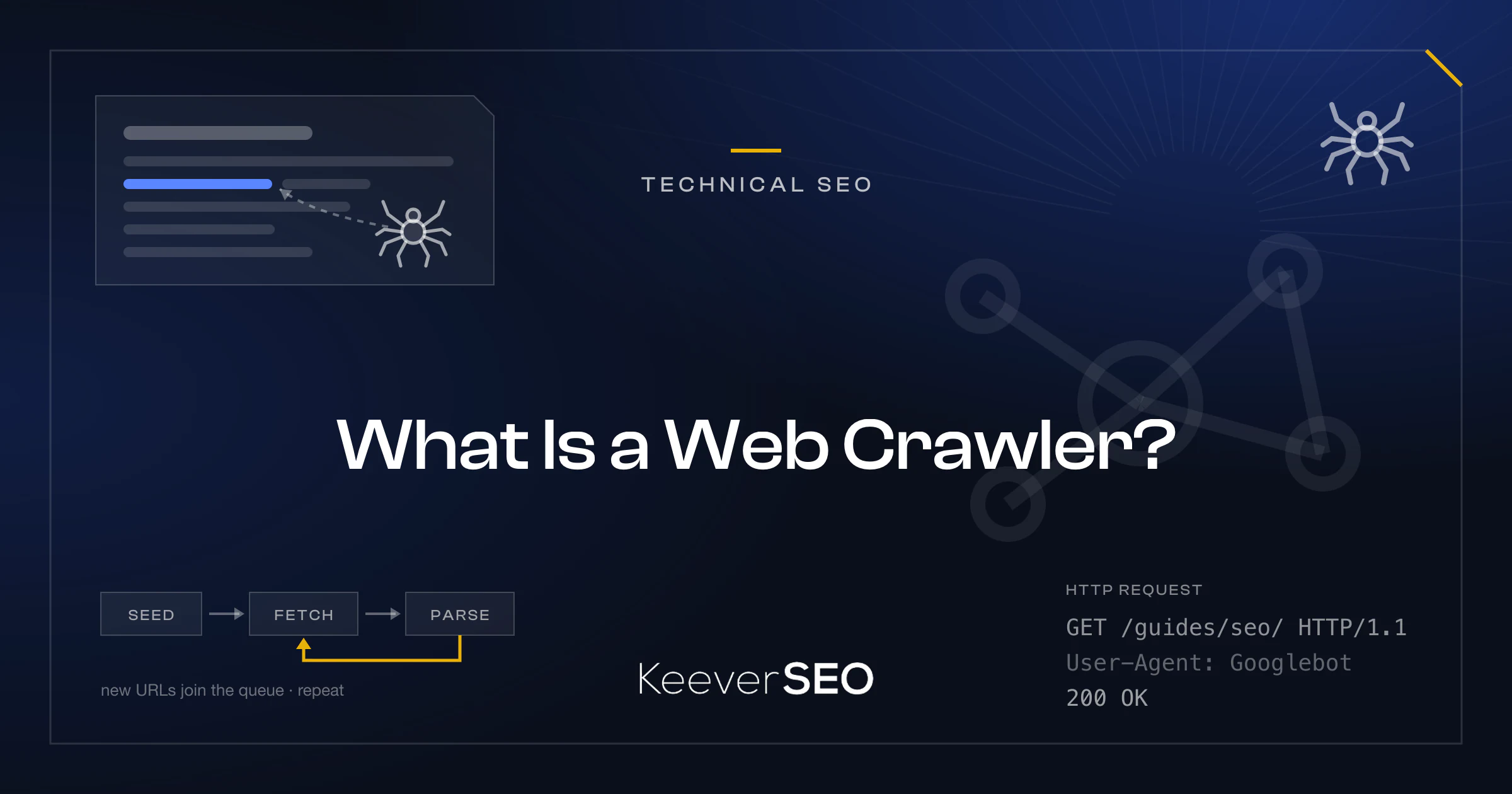
A web crawler, also known as a spider or bot, is an automated software program that browses the World Wide Web in a systematic way. The primary function of a web crawler is to download web pages and follow hyperlinks to discover new content for indexing. Search engines depend on crawlers to build the indexes of web content that users search.
Web crawlers start from a set of known pages called seed URLs, fetch each page, extract the links, and add the links to a queue for future visits. The cycle lets crawlers explore large parts of the web and keep search systems current with new or modified pages. Web crawlers download HTML content, parse documents for text and metadata, and identify new URLs for continuous exploration.
A web crawler is an automated software tool, also called a spider or bot, that moves through the internet in a systematic way to discover and download web pages by following links. Search engines rely on web crawlers to build and update the indexes that let users find relevant information through search queries.
Web crawlers begin with a list of seed URLs. As the crawler downloads each page, it parses the HTML to extract new links, which join a queue for future exploration. The loop of fetching, parsing, and scheduling new URLs lets crawlers map vast portions of the internet. Specific policies govern which pages the crawler visits, how often it revisits them, and how it avoids overloading web servers.
What Is a Web Crawler Bot or Spider?
A web crawler bot, also known as a spider, is an automated software program that browses and downloads content from the internet in a systematic way. The term "spider" comes from the way the bot moves across the web, following hyperlinks from one page to the next much as a spider moves across its web. The traversal lets the bot discover and index web pages at scale.
Search engines and AI providers operate most web crawler bots. Search engines like Google and Bing deploy crawler bots such as Googlebot and Bingbot to index vast amounts of web content and serve relevant search results. AI companies such as OpenAI run bots like GPTBot to collect data for training language models. Each bot identifies itself through a user-agent string in its HTTP requests, which lets website administrators manage and control crawler access to their sites.
How Does Web Crawling Differ From Search Engine Indexing?
Web crawling differs from search engine indexing in that crawling discovers and fetches pages while indexing parses, stores, and ranks what was fetched. Web crawling is the discovery and retrieval of web pages by automated bots, often called spiders or crawlers, which move through the internet downloading HTML content and following hyperlinks to uncover new URLs. The crawling stage centers on exploration and data collection.
Search engine indexing follows the crawling phase and centers on parsing, storing, and ranking the collected data. During indexing, the search engine analyzes the fetched pages, extracts information such as keywords and metadata, and stores the results in a structured database known as the index. The indexing phase decides the relevance and ranking of pages in search results. Not every crawled page is indexed: pages may be excluded when judged duplicate, low quality, or blocked by directives. Crawling finds and fetches content, whereas indexing organizes and prioritizes it for user queries.
How Does a Web Crawler Differ From a Web Scraper?
A web crawler differs from a web scraper in purpose: a crawler performs broad discovery, while a scraper performs targeted extraction. Web crawlers move through the internet to map its structure by following links and indexing content, with the goal of building a URL graph or index that represents the connectivity of the web. Web scrapers visit specific pages or sites to pull particular data fields, such as prices or contact details, and convert them into structured datasets.
The scope of the two tools differs as well. Crawlers operate across many domains, collect metadata, and explore every discoverable link, whereas scrapers work within a narrow scope, often a single site or a few pages, and extract precise information into databases or spreadsheets. Crawling often precedes scraping: a crawler first discovers and maps pages, and a scraper then revisits the URLs to extract the specific data points needed. Crawling is about discovery and navigation, while scraping is about data harvesting from known targets.
How Does a Web Crawler Work?
A web crawler works through a continuous cycle known as the crawl loop. The loop begins with a list of seed URLs that serve as starting points for content discovery. The crawler fetches each page through HTTP requests, downloads the HTML content, and parses it to extract embedded hyperlinks. The newly discovered URLs join a queue called the crawl frontier, where they await future visits, and the cycle repeats until a stop condition, such as a maximum page count or time limit, is reached.
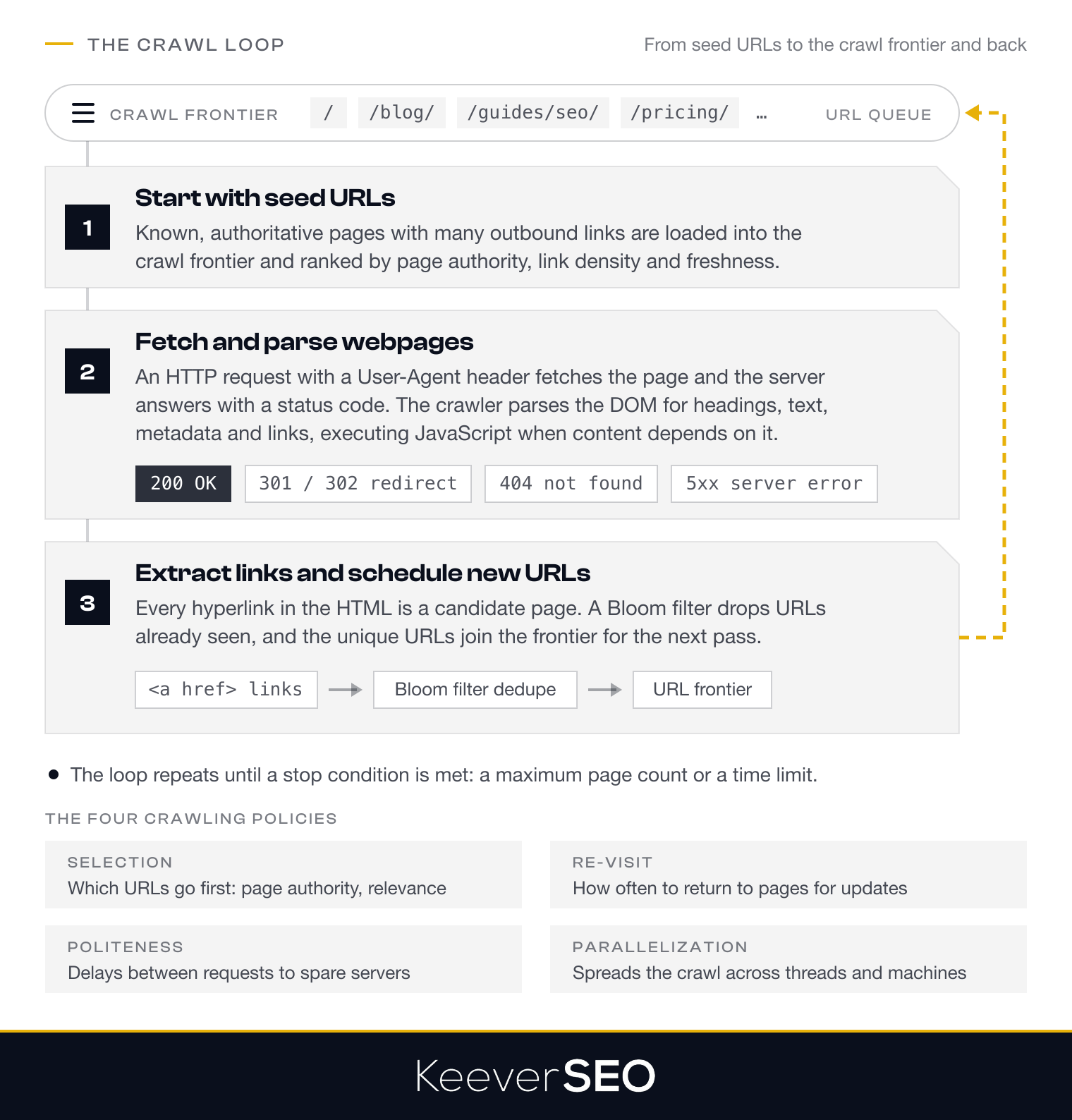
Web crawlers follow four core crawling policies. The selection policy decides which URLs to prioritize based on factors like page authority and relevance. The re-visit policy schedules how often the crawler returns to previously indexed pages to capture updates and keep content fresh. The politeness policy enforces rate limits and delays between requests so web servers are not overwhelmed. The parallelization policy manages how the crawler distributes tasks across several threads or machines for scalable operation.
The crawl loop breaks down into three steps, starting with how the crawler selects its initial seed URLs.
1. Start With Seed URLs
Web crawlers start with a seed URL list, a set of known URLs that serve as the starting points for web exploration. The seed URLs are chosen from well-established, authoritative web pages that are likely to carry many outbound links. The URLs are loaded into a crawl frontier, also known as a URL queue, where they are organized and prioritized by criteria such as page authority, link density, and relevance to the crawler's objectives.
Prioritization within the crawl frontier puts high-value pages first. Selection policies filter out low-quality or irrelevant URLs, which keeps the crawl focused. The prioritization often weighs page freshness and the number of inbound links, which indicate a page's importance. A strong set of seed URLs and a well-prioritized queue give the crawler a solid base for systematic exploration of the web.
Once the seed URLs are in place and prioritized, the web crawler fetches and parses the webpages and adds the new URLs it discovers to the crawl frontier.
2. Fetch and Parse Webpages
The fetch and parse step retrieves and interprets webpage content. The crawler sends an HTTP request to the server hosting the target URL and identifies itself through a User-Agent header, which lets servers recognize and manage bot traffic. The server responds with an HTTP status code that reports the page's availability: 200 for success, 404 for not found, 301 or 302 for redirects, and 5xx for server errors.
Once the HTML content is downloaded, the crawler parses the Document Object Model (DOM) to read the page's structure and extract elements like headings, paragraphs, metadata, and embedded links. For websites that rely on JavaScript to load content, advanced crawlers execute the JavaScript to render the full page and capture every element. The parsing step turns raw HTML into structured data, which lets the crawler extract hyperlinks and schedule new URLs for further exploration.
3. Extract Links and Schedule New URLs
The extract-and-schedule step identifies every hyperlink in a fetched page and queues the new URLs for crawling. After a web crawler fetches and parses a webpage, it locates the hyperlinks in the HTML document. Most links sit in anchor tags (<a href="...">), but links appear in images, scripts, and redirects as well. Each link represents a potential new page to explore and extends the crawler's map.
To avoid revisiting the same URLs, web crawlers perform deduplication, often through a Bloom filter. A Bloom filter is a probabilistic data structure that checks whether a URL has already been seen while using little memory. Deduplication prevents redundant crawling and conserves resources.
Once deduplicated, the unique URLs join the URL frontier, a queue that prioritizes links for future crawling. Crawlers use different traversal strategies: breadth-first traversal explores every link at the current depth before moving deeper, while depth-first traversal follows a single path deep before backtracking. The loop continues until a stop condition is met, such as a crawl limit or the crawler's objective, which gives full coverage of the web's interconnected structure.
What Types of Web Crawlers Exist?
The types of web crawlers are search-engine, focused, incremental, deep-web, AI and LLM, in-house, commercial, and open-source crawlers, each classified by purpose and function. The eight types are listed below:
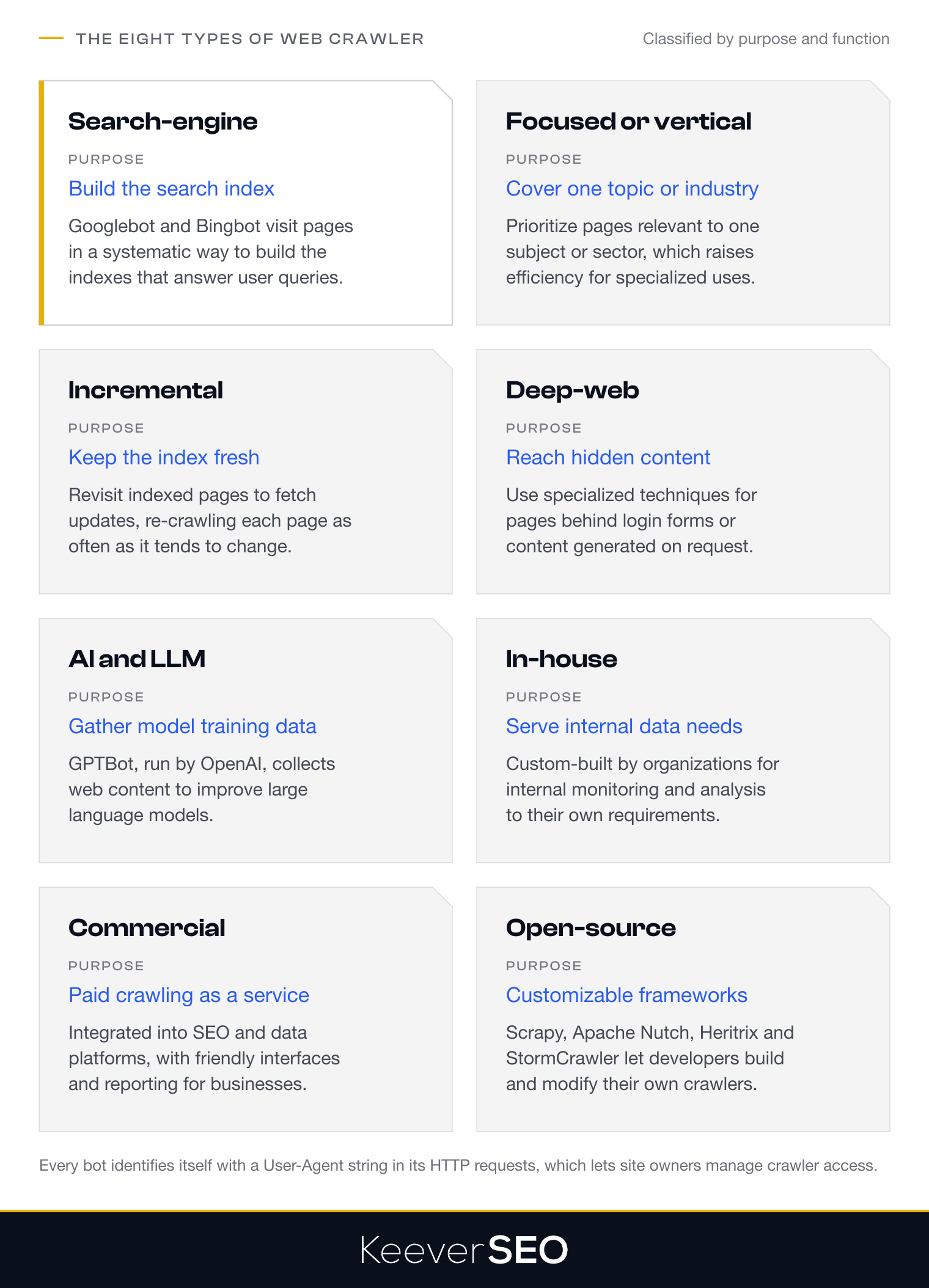
Search-Engine Crawlers Search-engine crawlers index the web for search engines. Googlebot and Bingbot are the prime examples, visiting web pages in a systematic way to build the search indexes that answer user queries.
Focused or Vertical Crawlers Focused or vertical crawlers target specific topics or domains rather than the entire web. The crawlers prioritize pages relevant to particular industries or subjects, which raises efficiency for specialized applications.
Incremental Crawlers Incremental crawlers revisit previously indexed pages to fetch updates and keep the index current. The crawlers balance fresh information against server load by re-crawling pages according to how often they change.
Deep-Web Crawlers Deep-web crawlers reach content that standard crawlers cannot, such as pages behind login forms or content generated on request. The crawlers use specialized techniques to reach the hidden areas of the web.
AI and LLM Crawlers AI and LLM crawlers gather data to train artificial intelligence models. GPTBot, operated by OpenAI, collects data to improve language models.
In-House Crawlers In-house crawlers are custom-built by organizations for specific data collection needs. The crawlers serve internal monitoring and data analysis according to each business's requirements.
Commercial Crawlers Commercial crawlers are paid services, often integrated into SEO and data platforms. The services offer user-friendly interfaces and reporting for businesses that want professional crawling.
Open-Source Crawlers Open-source crawlers like Scrapy, Apache Nutch, Heritrix, and StormCrawler give developers customizable frameworks. Teams can build and modify the crawlers to fit their needs with community support.
Why Do Web Crawlers Matter?
Web crawlers matter because they let search engines discover, index, and rank web pages, which makes information accessible worldwide. Without automated crawlers, search engines like Google and Bing could not build full indexes, and the visibility of the vast stores of information online would collapse. The foundational role of crawlers lets users find relevant information within seconds.
Beyond search, web crawlers drive data collection and artificial intelligence training. The crawlers gather the extensive datasets needed to train AI models, such as OpenAI's GPTBot, which collects content to improve generative AI. AI systems that rely on current web content for training and retrieval depend on that collection.
Web crawlers support business intelligence, academic research, and digital archiving as well. Businesses use crawlers to monitor brand mentions, track competitor activity, and gather industry insight. Institutions like the Internet Archive use them to preserve web history. Web crawlers turn the internet's vast, distributed content into structured, discoverable, and actionable information.
Who Uses Web Crawlers?
Web crawlers are used by search engines, SEO tools and agencies, AI training providers, market monitoring services, and research institutions. The five user groups are listed below:
- Search Engines: Search engines are the primary users of web crawlers, which they deploy to discover, fetch, and index billions of web pages. Google uses Googlebot to map the web and power its search results while keeping the index fresh and complete.
- SEO Tools and Agencies: Platforms like Ahrefs deploy crawlers to analyze website structures, identify technical issues, and monitor search visibility. The crawlers build link databases, track keyword rankings, and audit site health to guide organic search improvements.
- AI and LLM Training Providers: Companies like OpenAI use crawlers to gather extensive datasets for training large language models. The crawlers collect web content to build the training datasets behind systems like GPT, a practice that raises ongoing debate about content usage rights.
- Price and Market Monitoring Services: Focused crawlers track product listings, pricing changes, and competitor activity across e-commerce sites. The crawlers extract structured data for dynamic pricing strategies, inventory management, and competitive intelligence platforms.
- Research Institutions and Data Analysts: Researchers use web crawlers to collect large-scale datasets for academic studies, trend analysis, and archival projects. The crawlers gather information from social networks, news sites, and public databases to study how information spreads and to preserve historical web content.
What Can Limit a Web Crawler?
A web crawler can be limited by politeness rules, crawl budget, JavaScript rendering, gated content, anti-bot defenses, and resource costs. The six limits are listed below:
- Politeness and Rate Limits: Web crawlers must respect server capacity by spacing out requests, which prevents the overload that degrades performance for human users or crashes servers. Politeness policies impose delays between requests to the same domain.
- Crawl Budget: Search engines allocate a finite crawl budget to each website, which caps the number of pages a crawler can fetch in a given period. Large websites may find only a fraction of their pages crawled at regular intervals, which affects their visibility in search results.
- JavaScript-Heavy and Dynamic Sites: Traditional crawlers retrieve static HTML, but many modern websites rely on JavaScript frameworks to render content. Crawlers must execute the JavaScript to reach the content, which costs more computing resources and time.
- The Deep and Gated Web: A large share of the web sits behind login forms, paywalls, and search-only databases. The gated content stays out of reach for standard crawlers that follow links on their own.
- CAPTCHAs and Anti-Bot Defenses: Websites use CAPTCHAs and bot-detection systems to separate automated crawlers from human visitors. The defenses can halt crawler access or force crawlers to slow down.
- Resource and Bandwidth Cost: Operating web crawlers at scale demands heavy infrastructure investment. Downloading billions of pages requires enormous bandwidth, storage capacity, and computing power, which can be out of reach for smaller organizations.
What Legal and Ethical Rules Apply to Web Crawling?
The legal and ethical rules that apply to web crawling cover robots.txt compliance, the good-versus-bad bot distinction, crawler verification, terms-of-service and copyright limits, and data-privacy law. The five rule areas are listed below:
- Robots.txt Compliance: The robots.txt file is a voluntary protocol that tells web crawlers which parts of a website should not be accessed. The file carries no legal force, but ethical crawlers like Googlebot honor its directives as an industry standard and out of respect for webmaster preferences, and Google's "Robots.txt Introduction and Guide" states that robots.txt is not a mechanism for keeping a web page out of Google.
- Good-Versus-Bad Bot Distinction: The bot ecosystem separates "good bots" that follow site rules and identify themselves from "bad bots" that ignore restrictions and disguise their identity. Good bots such as search engine crawlers respect robots.txt files and send honest user-agent headers, whereas bad bots may engage in content theft or malicious activity.
- Crawler Verification: Website administrators can verify a crawler's authenticity through reverse-DNS verification, which checks that the crawler's IP address resolves to the claimed owner's domain and separates legitimate bots from impersonators, the method Google documents in "Verify Requests from Google Crawlers and Fetchers" as a reverse DNS lookup paired with a forward lookup.
- Terms-of-Service and Copyright Limits: Many websites publish terms of service that prohibit automated crawling or scraping, which creates a contractual barrier, and violating the terms can lead to breach-of-contract claims; in hiQ Labs v. LinkedIn (Ninth Circuit, April 2022), the court held that scraping publicly accessible pages does not violate the Computer Fraud and Abuse Act while leaving contract and tort claims open. Copyright law protects creative content, and unauthorized copying of protected material may constitute infringement.
- Data-Privacy Rules: Regulations like the General Data Protection Regulation (GDPR) and the California Consumer Privacy Act (CCPA) bind crawlers that collect personal data. The frameworks require lawful data collection, purpose limitation, and respect for individual rights, including erasure requests.
Why Does Crawlability Matter for SEO?
Crawlability matters for SEO because it decides how well search engines can access and index a website's content. When a site is easy to crawl, search engines discover and evaluate new pages fast and add them to the search index. Crawl access shapes a page's ability to rank, because only indexed pages can appear in search results, and Botify crawl data reported by Search Engine Land found that Google misses about half of the pages on large enterprise sites. Crawl budget, the number of pages a search engine will crawl on a site within a given period, is the constraint behind the process, and efficient use of crawl budget gets high-priority pages crawled more often while low-value pages consume fewer resources.
Google's Search Essentials list an unblocked Googlebot among the technical requirements for appearing in Google Search, which shows how crawl access underpins ranking potential. Good crawlability speeds up index updates as well, so search results reflect the latest site changes and visibility improves. Crawlability's role in SEO leads to the internal links that help crawlers discover pages and strengthen site architecture.
How Do Internal Links Help Search Crawlers Discover Pages?
Internal links help search crawlers discover pages by creating the pathways that guide a crawler from one page to the next. When a crawler lands on a page, it follows the internal links to reach other pages, which gives it a roadmap for discovery across the site.
Internal-link architecture acts as a discovery lever by reducing link depth, the number of clicks needed to reach a page from the homepage. Pages with fewer clicks are more accessible to crawlers and get indexed more often. Internal links distribute PageRank as well, the signal that passes authority from one page to the next, so pages linked from high-authority pages receive stronger ranking signals and better visibility in search results. Google's SEO Starter Guide recommends linking pages to each other so Googlebot can find new and updated pages across a website.
How Do Robots.txt Rules Guide a Web Crawler?
Robots.txt rules guide a web crawler by declaring which parts of a website the crawler may access. The text file sits in a site's root directory and carries instructions for specific user-agents, such as Googlebot or Bingbot. The main directives are Disallow, which blocks crawlers from specified paths, and Allow, which permits access to certain resources inside disallowed directories. The Crawl-delay directive asks crawlers to wait a set time between requests to prevent server overload. The rules are voluntary, but reputable crawlers follow them as a matter of etiquette. Webmasters can add meta robots tags inside HTML to control indexing, such as noindex to keep a page out of search results. The layered approach controls which content is crawled while protecting sensitive pages.
How Do XML Sitemaps Support Web Crawling?
XML sitemaps support web crawling by giving crawlers a direct list of a website's important URLs. An XML sitemap is a structured file that lists the important URLs on a site along with metadata such as lastmod (last modification date) to flag page updates. The metadata helps search engines prioritize which pages to crawl and how often to revisit them. Crawlers can find content through links, but XML sitemaps offer a direct map to pages that are hard to reach, such as deeply nested or newly added pages. Website owners submit sitemaps through platforms like Google Search Console, which tells search engines about the site's structure and updates, and the URL Inspection tool in Search Console reports how an individual page was crawled. Protocols like IndexNow allow real-time URL submissions, which speeds up the moment search engines learn of changes. A full list of URLs plus freshness signals raises the discoverability and indexing efficiency of website content.
How Do Canonical Tags Reduce Duplicate Crawling?
Canonical tags reduce duplicate crawling by pointing search engines to the preferred version of a webpage. The rel="canonical" link element names which URL should count as the authoritative source when several URLs display identical or similar content, which consolidates indexing signals on one main page instead of spreading them across duplicates.
Canonical tags help website owners manage crawl budget. Search engines such as Googlebot and Bingbot can then focus their resources on unique, valuable content and skip needless visits to duplicate pages, which lets crawlers prioritize fresh or updated content. Canonical tags are a strong signal rather than an absolute command, so search engines may still crawl duplicates when other signals point that way.
How Does Crawl Budget Affect Large Websites?
Crawl budget affects large websites by setting how many pages search engines will crawl and index. Crawl budget has two components: crawl rate limit and crawl demand. The crawl rate limit is the maximum number of requests a search engine bot will make to a site without overloading the server, which depends on the site's host load capacity. Crawl demand reflects a page's importance and update frequency, with more resources going to popular or often-updated pages.
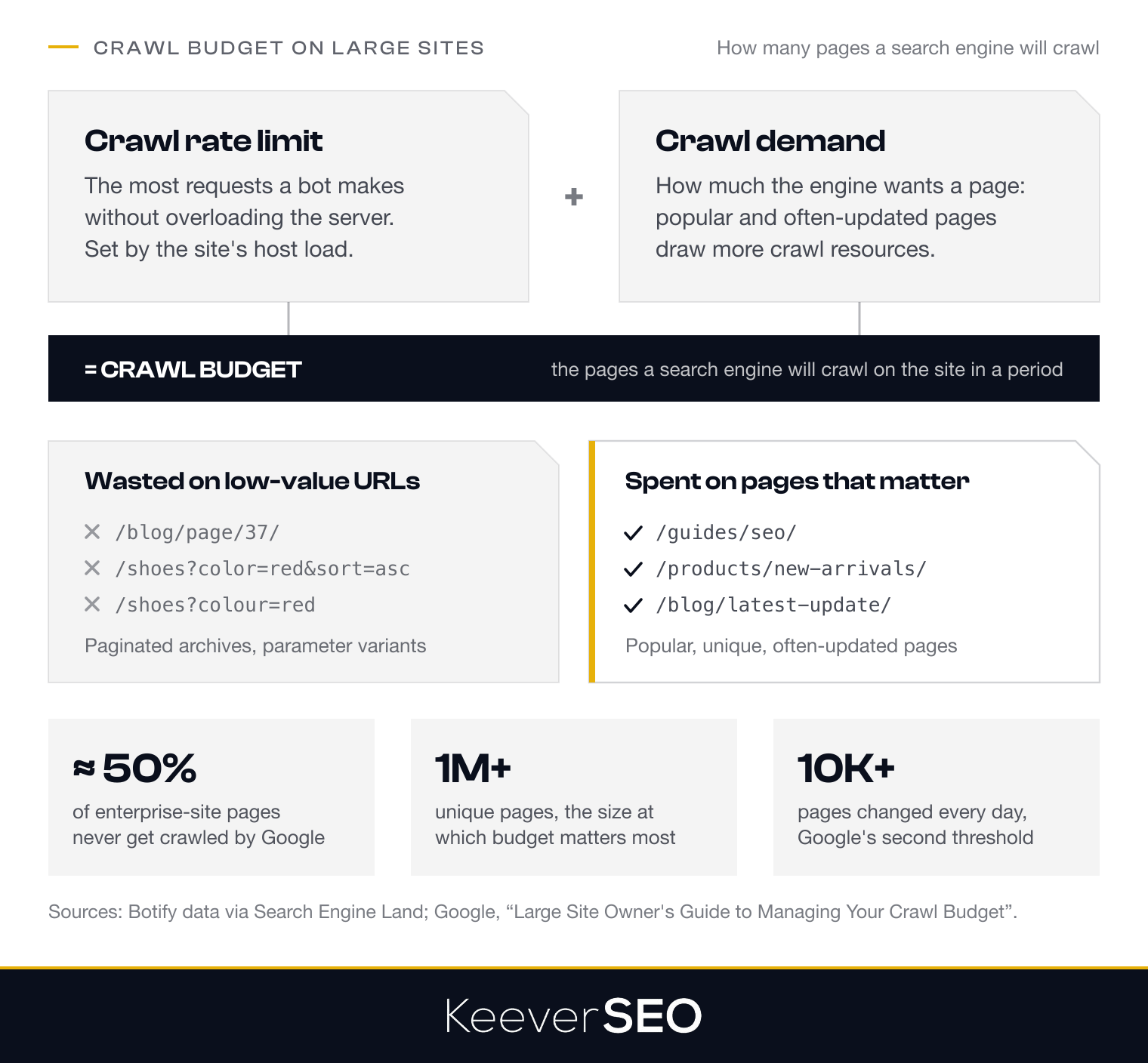
For large websites with many pages, inefficient use of crawl budget means missed opportunities. When crawlers spend resources on low-value or duplicate URLs, such as paginated archives or parameter variations, they may never reach the pages that matter, and the pages stay out of the index. Google's "Large Site Owner's Guide to Managing Your Crawl Budget" recommends improving server performance and reducing low-value URLs so crawl capacity goes to the pages that deserve indexing, and it notes that crawl budget matters most for sites with more than a million unique pages or more than 10,000 pages updated daily.
How Do SEO Crawlers Find Technical Issues?
SEO crawlers find technical issues by scanning a website in a systematic way and flagging the problems that hurt performance and search visibility. The issue categories they surface are listed below:
- Broken Links: URLs that return 404 errors and disrupt user navigation and link flow.
- 4xx and 5xx Errors: 4xx errors mark client-side issues like missing pages, while 5xx errors mark server-side failures.
- Duplicate Titles: Pages with identical title tags, which confuse search engines and dilute relevance.
- Blocked Resources: CSS, JavaScript, or images blocked from loading, which prevents full page evaluation.
- Slow Time to First Byte (TTFB): High TTFB points to server slowness, which hurts both crawl efficiency and user experience.
- Redirect Chains and Loops: Inefficient URL handoffs mapped to expose broken or excessive redirects.
- Duplicate or Thin Content: Repeated pages flagged for canonicalization or consolidation.
- Indexability and Crawlability Issues: Pages that are blocked or non-indexable, flagged for processing difficulties.
- JavaScript Rendering Issues: Content that loads only after scripting, where crawlers may show gaps in rendering.
- Orphan Pages and Weak Internal Linking: Pages that are hard to reach through links, identified to improve discovery.
Tools like Screaming Frog, Sitebulb, and Ahrefs Site Audit produce full reports on the issues with actionable fixes.
When Should You Hire an SEO Agency for Crawlability?
You should hire an SEO agency for crawlability when crawl problems exceed what an in-house team can resolve. The threshold is reached when persistent crawl errors, indexing gaps, or traffic drops trace back to technical complexity that demands specialized tools and expertise. A website with recurring crawl errors, or with important sections still unindexed despite internal effort, has a problem beyond the reach of internal resources, and our technical SEO agency supplies the technical expertise to diagnose and resolve it.
We add the most value when a website's scale and technical architecture outgrow an in-house team. The complexity may come from a site redesign, a migration, or the arrival of JavaScript frameworks that block crawler access. We bring dedicated crawler tools and log-file analysis that reveal patterns like redirect chains or duplicate URLs that waste crawl budget, and we prioritize fixes by impact so the most damaging issues are resolved first.
Engaging us turns crawlability issues into a concrete technical roadmap. The roadmap resolves the existing barriers and equips the internal team with the knowledge and tools to sustain the improvements.
How Can an SEO Agency Diagnose Indexing Barriers and Improve Site Architecture?
We diagnose indexing barriers through a full technical analysis that identifies the structural obstacles keeping crawlers from reaching and indexing content. The analysis starts with orphan pages, valuable content that lacks internal links and stays invisible to crawlers. We analyze redirect chains, where crawlers pass through several URLs before reaching the destination, which wastes crawl budget and dilutes link equity. Crawl depth is measured to confirm that important pages sit within three to four clicks of the homepage, because deeper paths lose crawler attention. Log-file analysis shows actual crawler behavior, including which pages are requested most and where errors occur, and the agency cross-references the data with indexability status in Search Console to pinpoint pages that are fetched but not indexed because of quality issues or canonicalization conflicts.
Once the indexing barriers are mapped, we redesign the site architecture to give crawlers efficient pathways. The redesign consolidates or prunes low-value URLs that drain crawl resources and keeps priority content within easy reach. The diagnostic approach turns technical debt into a strategic roadmap for crawl efficiency, and its findings feed the crawl audit that follows, which covers status codes, canonical tags, noindex directives, sitemap alignment, blocked resources, and log-file patterns.
What Should an SEO Crawl Audit Include?
An SEO crawl audit should include orphan pages, redirect chains, crawl depth, log-file analysis, indexability status, broken links, and duplicate content. The seven checkpoints are listed below:
Orphan Pages Orphan pages are URLs with no internal links pointing to them. Crawlers often miss the pages because they sit outside the site's navigational structure, and linking them strengthens site architecture and organic traffic potential.
Redirect Chains Redirect chains occur when a URL redirects to a second URL, which redirects to a third, in a sequence like A to B to C. Each extra redirect consumes crawl budget and can dilute link equity, so the audit identifies and shortens the chains.
Crawl Depth Crawl depth measures the number of clicks required to reach a page from the homepage. Pages buried deep in the hierarchy are crawled and indexed less often, so reducing crawl depth keeps important content accessible and prioritized.
Log-file Analysis Log-file analysis examines server logs to read crawler behavior, including which URLs are visited and how often. The analysis exposes crawl budget wasted on low-value pages and shows where crawler activity can be redirected.
Indexability Status Indexability status checks whether pages can be indexed under robots.txt directives, noindex tags, and canonical tags. The check confirms that the intended pages are both crawlable and indexable.
Broken Links Broken links are internal or external links that lead to non-existent pages and return 404 errors. The links waste crawl budget and disrupt the user experience, so the audit identifies and fixes them.
Duplicate Content Duplicate content covers pages with identical or near-identical content, which fragments ranking signals and drains crawl budget. The audit maps the duplicates and verifies that canonical tags consolidate them.
Working through the seven checkpoints leaves the website optimized for crawling and indexing, which lifts its visibility and performance in search results.
How Can an SEO Agency Improve Crawl Efficiency?
An SEO agency can improve crawl efficiency by pruning low-value URLs, fixing redirect chains, consolidating canonicals, refining sitemaps and internal links, and tuning server load. The five techniques are listed below:
- Pruning Low-Value URLs: The agency identifies and removes URLs with little indexing value, such as parameter pages and thin content, so crawlers prioritize the pages that matter.
- Fixing Redirect Chains: The agency replaces multiple hops with a single 301 redirect to the final destination, which cuts crawl budget consumption and speeds page discovery.
- Canonical Consolidation: The agency applies
rel="canonical"tags to merge duplicate or similar URLs into a preferred version, which prevents redundant crawling and concentrates effort on the authoritative pages. - Sitemap and Internal-Link Optimization: The agency refines XML sitemaps to include only canonical, indexable URLs and strengthens internal-link structures so important pages sit within easy reach, which reduces crawl depth and connects orphan pages.
- Server and Host-Load Tuning: The agency improves server response times and manages host load so crawlers can fetch more pages without throttling.
The five techniques make every crawler visit count toward indexing value and site performance.
What Should You Check in a Web Crawler Report?
You should check crawl status codes, indexability, crawl depth, orphan URLs, duplicate URLs, blocked resources, and internal-link distribution in a web crawler report. The seven elements are listed below:
- Crawl Status Codes: The codes report URL health: a 200 status means the page is accessible, while 4xx and 5xx codes mark errors that need fixing.
- Indexability: The indexability column shows whether pages are set to be indexed, so check for noindex tags or robots.txt directives that block important content.
- Crawl Depth: The metric shows how many clicks separate a page from the homepage, and pages deep in the hierarchy are harder for crawlers to find.
- Orphan URLs: Orphan URLs are pages with no internal links pointing to them, which stay invisible to crawlers unless linked from other pages.
- Duplicate URLs: URLs that lead to the same content confuse search engines and dilute ranking signals, so the report should flag them.
- Blocked Resources: Resources like CSS, JavaScript, and images must stay open to crawlers, because blocking them affects page rendering and indexing.
- Internal-Link Distribution: The distribution of internal links shows whether important pages receive enough link equity to be prioritized by crawlers.
Checking the seven elements in a web crawler report keeps a website visible and lets search engines index the site in full.