User experience (UX) impacts SEO by shaping search rankings: search engines reward pages that satisfy the searcher's task. In an SEO context, user experience means the quality of interaction a visitor has with a website, spanning usability, accessibility, page speed, navigation, and content clarity. The connection decides search visibility, since search engines judge whether a page fulfills user intent through search satisfaction and page-experience evaluation.
User experience influences SEO through two signal families: content-relevance signals and page-experience signals. Content-relevance signals cover readability, scannability, content depth, and visual formatting. Page-experience signals cover Largest Contentful Paint (LCP), Interaction to Next Paint (INP), Cumulative Layout Shift (CLS), mobile responsiveness, and secure connections. UI/UX quality carries search visibility for ecommerce and lead-generation sites alike, where design, clarity, and usability drive engagement and conversions.
The technical foundation of UX runs through Core Web Vitals, page speed, site architecture, navigation, and mobile-friendly design. Prioritizing UX issues by SEO impact starts with an SEO audit that finds the high-friction areas, and complex UX-SEO integration is where an SEO agency earns its place. An agency's UX audit evaluates usability, accessibility, performance, and mobile behavior, and ongoing optimization ties the UX improvements to sustained search visibility, which is how user experience impacts SEO in practice.
What is user experience in SEO?
User experience in SEO is the quality of interaction between a user and a webpage, read through usability, accessibility, and satisfaction. Usability means the page is easy to move through and its actions easy to complete. Accessibility means every user, including users with disabilities, can reach and use the content. Satisfaction means the visit runs efficient and frustration-free, meeting the user's need.
In SEO terms, user experience picks up where discoverability ends. SEO makes content findable through keywords and technical optimization; user experience governs what happens after the click. Both serve the same goal, connecting users with the answers and tasks they came for, and both feed search visibility when users engage and stay.
The pairing matters because search engines reward pages that deliver a high-quality experience, from page speed and mobile responsiveness to intuitive navigation. User experience in SEO closes the loop between finding a page and finding it worth using.
How does user experience differ from traditional technical SEO?
User experience differs from traditional technical SEO in focus: UX manages user-facing quality, clarity, navigation, speed, and ease of task completion, while technical SEO manages back-end access, crawlability, indexing, and structured data, so search engines can process the site. UX reduces friction for visitors; technical SEO removes barriers for search engines.
The two disciplines fail independently. A technically flawless site can still frustrate users with clumsy navigation or slow loads, and a beautiful site can stay invisible when indexing and rendering misfire. A complete strategy runs both, in different roles, toward the same visibility.
How does user experience influence SEO?
User experience influences SEO as a quality signal search engines read when ranking pages. Google in particular rewards pages that deliver a satisfying experience, because satisfaction means the page met the searcher's need and fulfilled the intent behind the query.
The evaluation runs on usability, accessibility, and satisfaction, the qualities that keep users engaged instead of bouncing back to the results page, the pattern known as pogo-sticking. Google's Page Experience update folded user-centric metrics, Core Web Vitals first among them, into the ranking systems, and Google's Core Web Vitals documentation states the metrics "align with what our core ranking systems seek to reward," cementing experience as a ranking input.
Pages that hold attention and complete tasks read as more relevant and more useful to the systems ranking them. The dual evaluation, search satisfaction on one side and page-experience signals on the other, keeps visibility flowing toward the pages that serve users best.
Search satisfaction and page-experience evaluation
Search engines evaluate page experience through a defined set of signals: Core Web Vitals, HTTPS, the absence of intrusive interstitials, and mobile usability. Core Web Vitals measure loading performance, interactivity, and visual stability through Largest Contentful Paint (LCP), Interaction to Next Paint (INP), and Cumulative Layout Shift (CLS), so a site meeting the thresholds reads as fast and stable.
HTTPS secures data in transit, the baseline of user trust, and mobile usability reads how well the site fits smaller screens. The signal set quantifies experience quality page by page, and pages that score well on it earn visibility and engagement together.
Matches search intent
Matching search intent is the first user-experience lever in SEO. Intent-content alignment means the page's format, depth, and structure fit the user's goal, information, navigation, or transaction, so engagement and task fulfillment follow. Content that answers the actual query improves the experience signals search engines read, from time on page to interaction rates, and the lever works both ways: even a technically perfect page fails when it misses the intent behind the search.
Delivers fast, stable interactions
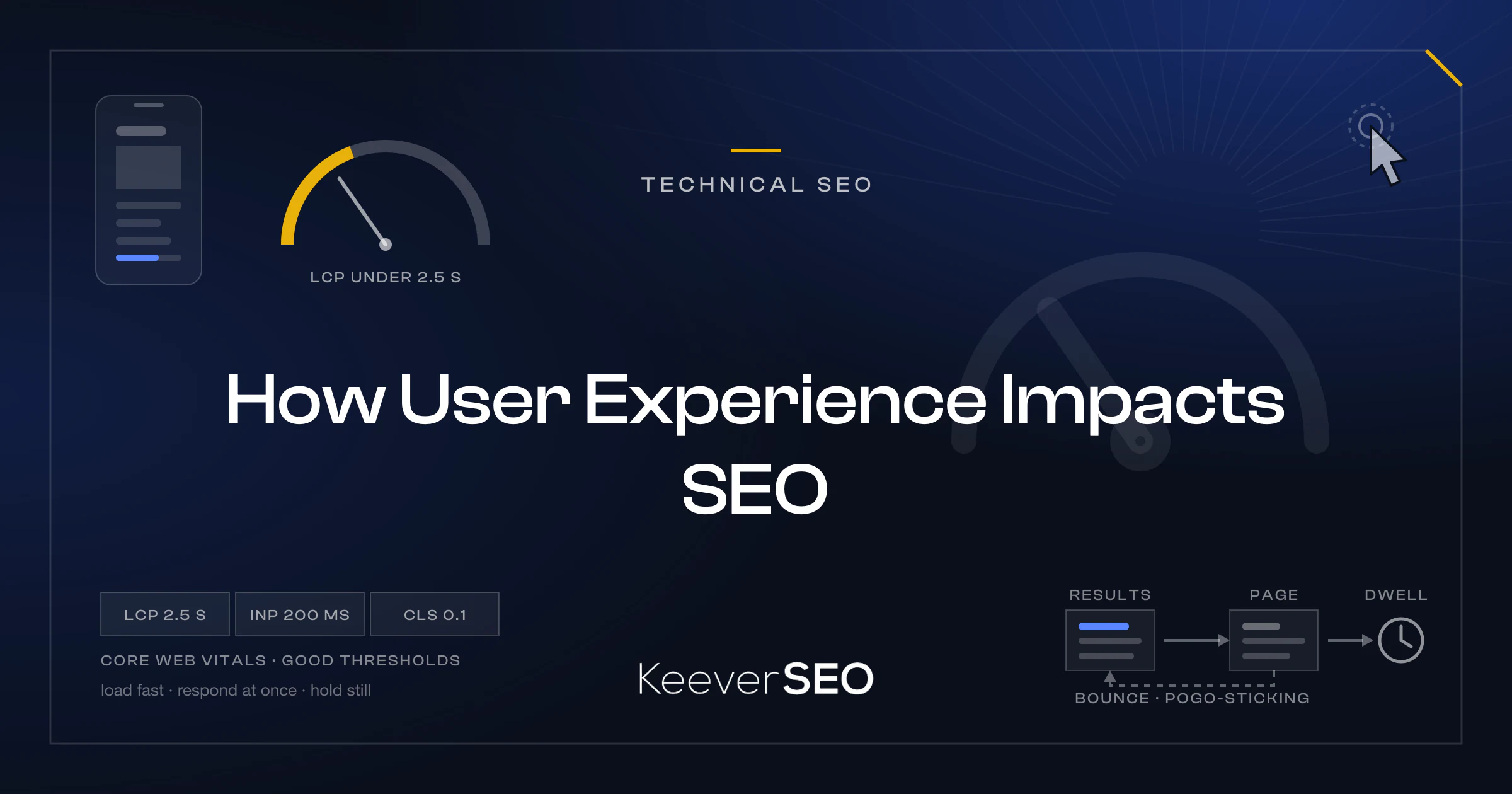
Fast, stable interactions rest on load speed and visual stability. Largest Contentful Paint (LCP) measures how quickly the main content becomes visible, with 2.5 seconds the target. Interaction to Next Paint (INP), which replaced First Input Delay (FID), tracks how quickly the page answers user input, with 200 milliseconds the bar. Cumulative Layout Shift (CLS) measures unexpected movement of page parts, with 0.1 or lower the goal. Pages hitting all three thresholds load fast, respond at once, and hold still, satisfying users and signaling quality to search engines in the same motion.
Enables intuitive task completion
Intuitive task completion rests on navigation and findability. A logical architecture with clear paths lets users reach the information or function they need without confusion, built from clear labeling, predictable menu structures, and organized internal linking. Navigation of that kind lifts engagement signals, since users finish what they came to do instead of abandoning it, and completed tasks reinforce the page's relevance in the rankings.
What UX SEO factors affect rankings and how?
The UX SEO factors that affect rankings work through the mechanisms detailed below.
Intent Match Pages aligned with the searcher's intent, informational, navigational, or transactional, demonstrate relevance and cut pogo-sticking, the return trips to the results page that mark unfinished tasks. Lower bounce rates and higher engagement read as content quality.
Readability and Scannability Clear typography, right-sized fonts, and structured headings let users extract information fast. Longer dwell times and lower bounce rates follow, marking quality to the systems measuring engagement.
Site Architecture and Navigation A logical hierarchy, with no page more than four clicks from the homepage, serves crawlers and users at once. Internal linking distributes page authority and cuts friction on the way to task completion.
Page Speed Speed feeds rankings through Core Web Vitals and retention together: pages inside the 2.5-second LCP bar hold users, slow pages bleed them, and measured site-speed gains translate into measured conversion gains.
Mobile-Friendliness Google's mobile-first indexing makes the mobile experience the ranked experience. With mobile devices carrying roughly 62% of web traffic per StatCounter's platform data, responsive design, right-sized touch targets, and intuitive small-screen navigation decide rankings and revenue together.
Accessibility Compliance with the Web Content Accessibility Guidelines (WCAG), from alt text and keyboard navigation to screen-reader compatibility, widens usability to every user and correlates with stronger engagement and reach.
Visual Hierarchy and Layout Clear calls-to-action, purposeful visuals, and logical organization cut cognitive load and guide users to the content that matters. When tasks complete faster, behavioral signals like pages per session and time on site rise with them.
The collective effect shows up in technical metrics, Core Web Vitals first, and in behavioral signals from engagement time to conversion rate, which is why UX design and SEO now run as one discipline.
What types of user experience signals affect SEO?
The types of user experience signals that affect SEO fall into two families:
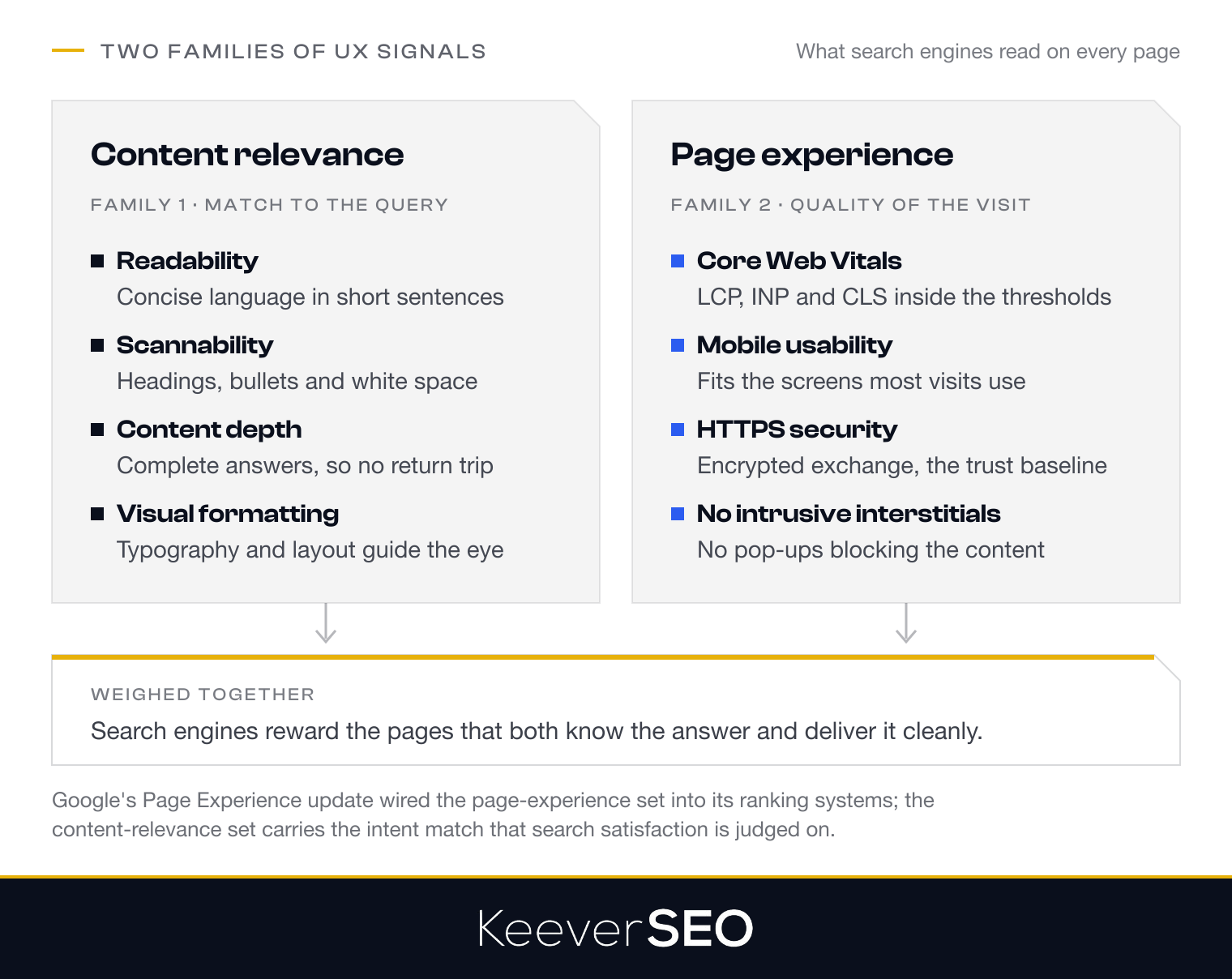
- Content-relevance signals: how well the page's information matches the searcher's intent, carried by readability, scannability, content depth, and visual formatting, so users find and consume what they need.
- Page-experience signals: the technical and interactive quality of the visit, carried by Core Web Vitals, mobile usability, HTTPS security, and the absence of intrusive interstitials.
Weighing content quality and interaction quality together, search engines reward the pages that both know the answer and deliver it cleanly.
Content-relevance signals
Content-relevance signals carry the match between a page and the intent behind the query:
- Readability: clear, concise language in short sentences, pitched to the audience's comprehension level.
- Scannability: headings, bullet points, and white space that let users locate key information at a glance.
- Content depth that meets intent: answers complete enough that searchers never return to the results page for more.
- Visual formatting: typography, images, and layout that guide the eye and make complex information digestible.
The four signals together tell search engines how relevant and how usable a page's content is, and the ranking potential follows.
Page-experience signals
Page-experience signals measure the usability and performance search engines score on every visit: Core Web Vitals, mobile usability, HTTPS security, and the absence of intrusive interstitials. Core Web Vitals read loading performance, interactivity, and visual stability through Largest Contentful Paint (LCP), Interaction to Next Paint (INP), and Cumulative Layout Shift (CLS), while mobile usability confirms the site works on the devices most visits come from.
HTTPS encrypts the exchange between user and site, feeding trust and credibility, and interstitial-free pages keep content unobstructed. Google's Page Experience update wired the signal set into the ranking systems, rewarding fast, secure, user-friendly interaction, the bridge between technical quality and search visibility.
How does bounce rate optimization affect UX SEO?
Bounce rate optimization affects UX SEO as a contextual indicator of engagement rather than a direct ranking factor. Bounce rate counts the visitors who leave after one page; dwell time and engagement time read satisfaction more deeply by tracking how long users stay and interact. Pogo-sticking, the quick return to results to pick another page, marks a content-intent mismatch. A high bounce rate is not damning on its own: a single-page visit can mean instant success when the user found the answer at once, and Google's John Mueller has called the ranking role of bounce rate a misconception, stating analytics bounce rate is not used in ranking, as Search Engine Journal documents in its ranking-factors analysis. The work that pays is fixing the UX behind bad bounces, slow loads, poor mobile experience, unclear navigation, misaligned content, because those fixes move the page-experience signals and engagement metrics that do influence rankings. The goal stays fixed: users complete their task, whether across many pages or one.
Why is UI/UX important for SEO?
UI/UX is important for SEO because it drives the engagement and visibility search engines measure. Google favors sites with superior user experiences, the sites that retain visitors and convert them, and UI/UX design decides whether users can move through a site, find information, and finish tasks.
The connection runs through page experience signals: visual stability, interaction responsiveness, and mobile usability all trace back to UI/UX decisions. Poor UI/UX shows up as high bounce rates and weak engagement, reading to search engines as a subpar experience, while clear visual hierarchies and accessible design patterns produce the positive interactions that lift SEO from below.
UI/UX investment competes on hard numbers. Virgin America's responsive redesign lifted conversions by more than 10%, as documented in The One Club's award case study of the project, and in a web where mobile devices carry roughly 62% of traffic, responsive, mobile-friendly interfaces are the price of both rankings and revenue.
How do usability, accessibility, and satisfaction support search visibility?
Usability, accessibility, and satisfaction support search visibility by raising the quality of every interaction. Usability keeps navigation intuitive, cutting friction and abandonment, the effectiveness signal search engines read. Accessibility, anchored in the Web Content Accessibility Guidelines (WCAG), extends the site to users with disabilities through proper heading structures, alt text, and keyboard navigation, and it strengthens site quality and crawlability along the way. Satisfaction shows in engagement metrics, time on page and task completion, which mark content-intent alignment. The World Wide Web Consortium (W3C) notes that accessible design serves users with disabilities and reinforces technical SEO fundamentals at once, from structured markup to mobile responsiveness. Together the three qualities build a retention-driven site where users find what they need, engage, and return, and search visibility follows.
Who needs UX SEO?
Any website that lives on search visibility needs UX SEO: e-commerce platforms, lead-generation sites, content publishers, and service businesses. Each depends on user experience to convert its search rankings into outcomes.
E-commerce Platforms
E-commerce sites need UX SEO for product discovery, checkout flow, and conversion. A clean experience means customers find and buy products without friction, and sales follow.
Lead-Generation Sites
Lead-generation websites need UX SEO to make forms intuitive, build trust, and walk visitors to the call to action, converting more of the traffic into qualified leads.
Content Publishers and Service Businesses
Content publishers and service businesses need UX SEO to keep content accessible, readable, and navigable, holding the retention and satisfaction that competitive search visibility demands.
Of the four, e-commerce and lead generation carry the heaviest conversion stakes, and each uses UX SEO in its own way.
How do ecommerce websites benefit from UX SEO?
Ecommerce websites benefit from UX SEO through sharper product discovery, lighter checkout friction, and higher conversion rates. An optimized experience lets customers find products through intuitive navigation and working search, supported by clear category pages, useful filters, and detailed product descriptions.
Checkout friction falls through streamlined flows: fewer form fields, transparent pricing, guest checkout. Every removed step cuts cart abandonment, the ecommerce killer, and smooths the path from interest to order.
UX SEO feeds search visibility on top: search engines rank the better experience higher, putting the store in front of more customers, and mobile-friendly responsive design keeps the experience working for the mobile majority of shoppers, holding visibility and satisfaction together.
How do lead-generation websites benefit from UX SEO?
Lead-generation websites benefit from UX SEO through form usability, trust, and task completion. Form usability leads: clear forms with logical field sequences, right input types, and mobile-friendly layouts lose fewer visitors before the submit button. Trust builds through security badges, plain privacy policies, and professional design, the signals that make visitors comfortable sharing contact information, and the same signals cut bounce rates and lift engagement. Task completion runs on navigation and content hierarchy that walk users from problem awareness to solution to conversion, so scheduling a consultation or requesting a quote never takes more effort than it should.
How do Core Web Vitals measure user experience for SEO?
Core Web Vitals measure user experience for SEO across loading performance, interactivity, and visual stability, with the thresholds laid out in the table below.
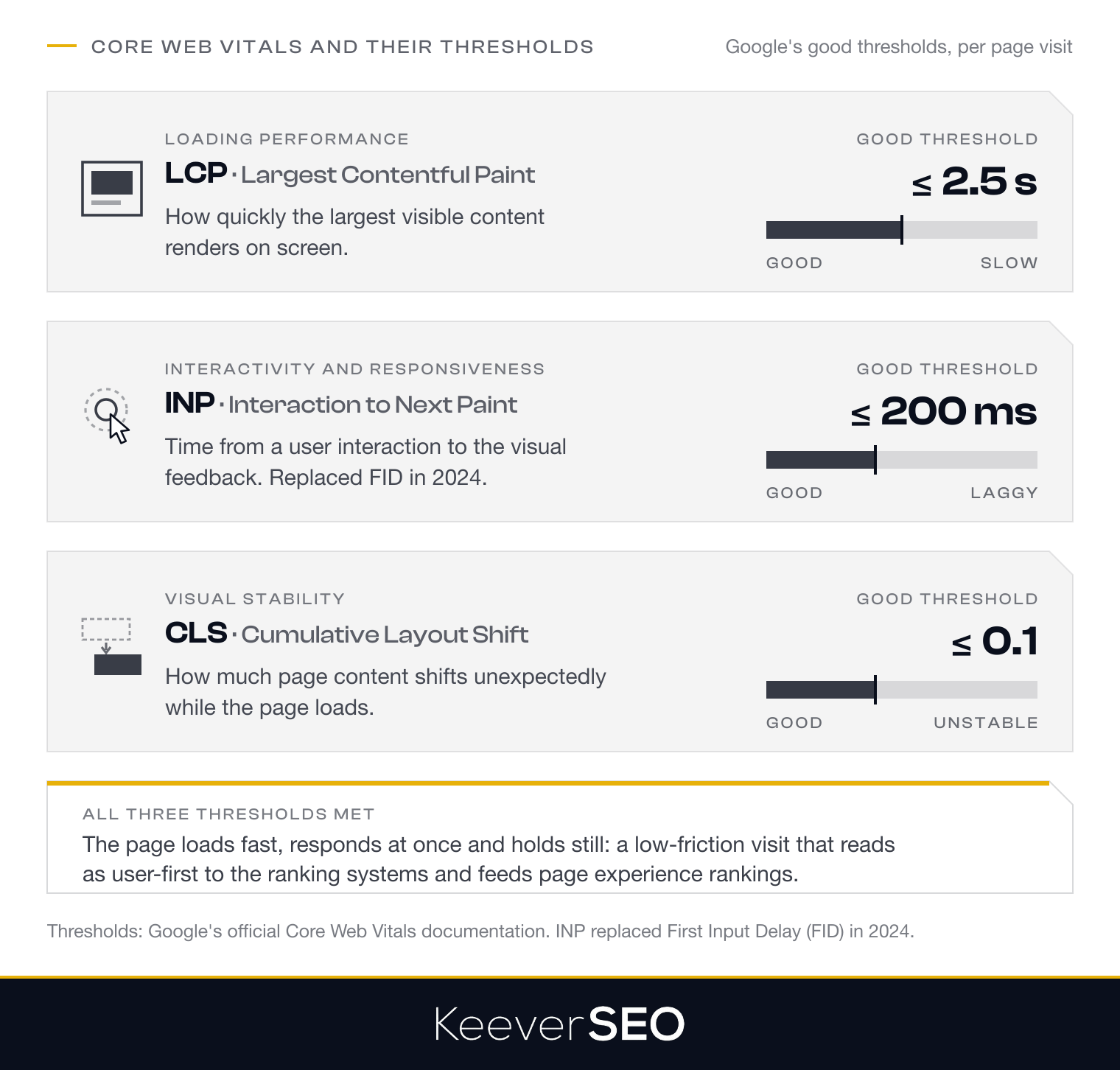
| Metric | What It Measures | Good Threshold |
|---|---|---|
| LCP (Largest Contentful Paint) | Loading performance: how quickly the largest visible content renders | 2.5 seconds or less |
| INP (Interaction to Next Paint) | Interactivity and responsiveness: time from user interaction to visual feedback (replaced FID in 2024) | 200 milliseconds or less |
| CLS (Cumulative Layout Shift) | Visual stability: how much page content shifts unexpectedly during loading | 0.1 or less |
The threshold values follow Google's official Core Web Vitals documentation, and pages meeting all three deliver low-friction visits for most users, which signals user-first priorities to the ranking systems and feeds page experience rankings and visibility.
How do page speed and performance affect UX SEO?
Page speed and performance affect UX SEO by moving engagement and rankings together. Faster loads cut bounce and lift conversion: pages inside the 2.5-second bar hold users, while loads past 3 seconds bleed them. Core performance metrics, from Time to First Byte (TTFB) to render speed, feed search engines' read of site quality. The revenue stakes are measured: the Google-commissioned Deloitte study "Milliseconds Make Millions" found a 0.1-second improvement in mobile site speed lifted retail conversions by 8.4%. Fast pages satisfy users and the algorithms in one stroke, supporting rankings and organic visibility that hold.
How do site architecture and navigation affect UX and SEO?
Site architecture and navigation affect UX and SEO by structuring how content gets reached, by people and by crawlers. An organized architecture gets users to information fast, and a logical hierarchy gets search engines crawling and indexing efficiently, lifting visibility from the foundation.
Internal Linking and Crawlability Internal linking distributes page authority and routes crawlers through related content. Strong internal links keep important pages indexed reliably and users moving between related topics, and rankings track the difference.
Navigational Clarity Clear menus, breadcrumbs, and contextual links keep users oriented and tasks moving. Descriptive anchor text in the links tells search engines what each target page covers, reinforcing topical authority page by page.
How does mobile-friendly design support UX SEO?
Mobile-friendly design supports UX SEO by keeping the site usable on the devices that carry most visits. Responsive design fits the layout to any screen size and orientation, holding usability constant across devices. Mobile-first indexing raises the stakes: search engines rank from the mobile version, so mobile optimization is search visibility. Touch targets sized and spaced for fingers keep tasks completing, while sites without mobile-friendly design show the higher bounce and lower engagement that read as poor experience. Mobile responsiveness meets users and search engines with the same work, and SEO performance holds because of it.
How should UX issues be prioritized for SEO?
UX issues should be prioritized for SEO by their ranking and engagement impact, in the order below:
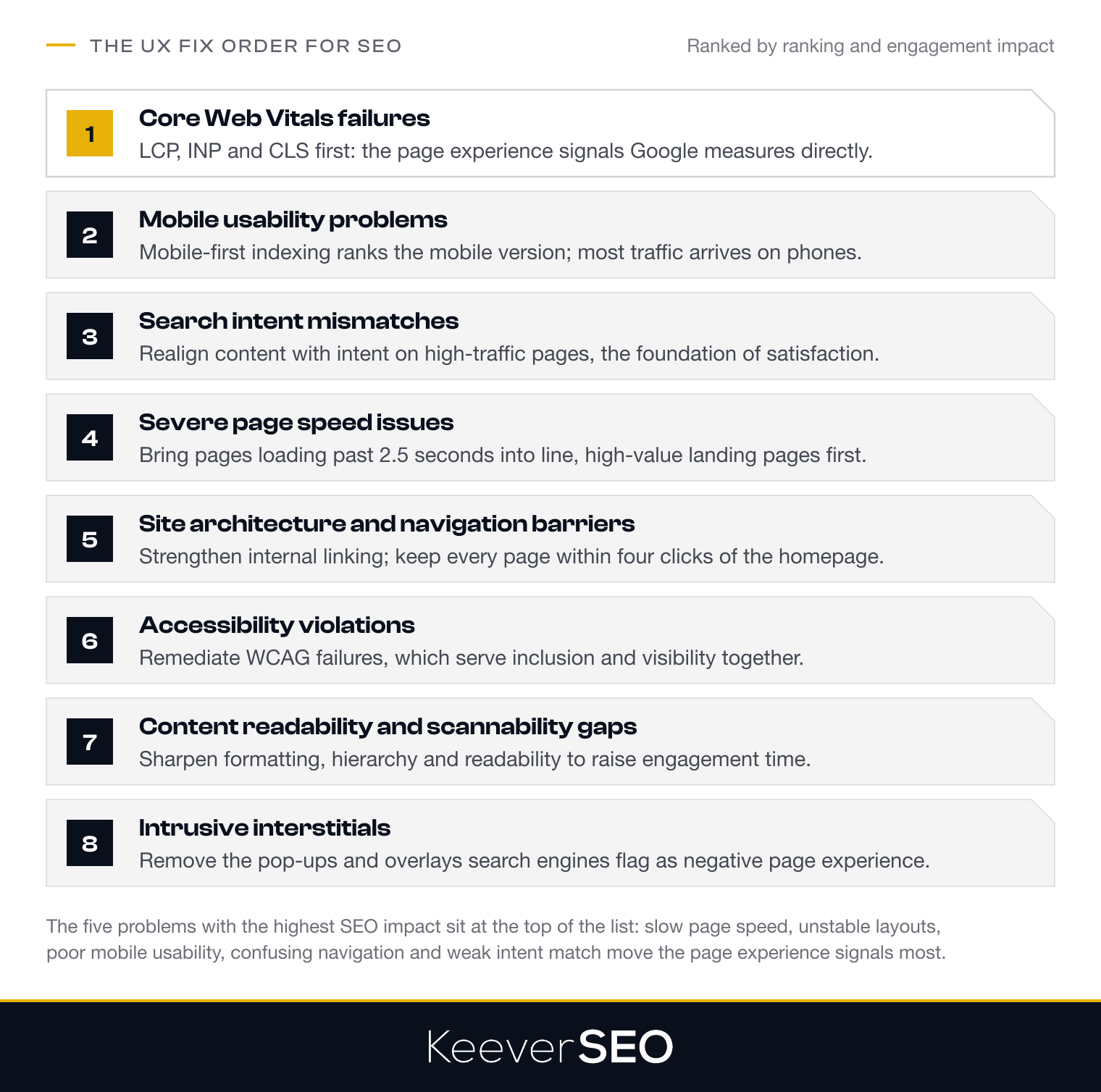
- Core Web Vitals failures: fix Largest Contentful Paint (LCP), Interaction to Next Paint (INP), and Cumulative Layout Shift (CLS) first, since they are the page experience signals Google measures directly.
- Mobile usability problems: fix mobile-friendliness immediately under mobile-first indexing, with most traffic arriving on phones.
- Search intent mismatches: realign content and intent on high-traffic pages, the foundation of satisfaction.
- Severe page speed issues: bring pages loading past 2.5 seconds into line, high-value landing pages first, since speed moves bounce and conversion.
- Site architecture and navigation barriers: strengthen internal linking and clarity, keeping every page within four clicks of the homepage.
- Accessibility violations: remediate WCAG failures, which serve inclusion and visibility together.
- Content readability and scannability gaps: sharpen formatting, hierarchy, and readability to raise engagement time.
- Intrusive interstitials: remove or redesign the pop-ups and overlays search engines flag as negative page experience signals.
Which UX problems have the highest SEO impact?
The UX problems with the highest SEO impact are listed below:
- Slow page speed: pages with poor Largest Contentful Paint (LCP) performance bleed users before the content arrives.
- Unstable layouts: high Cumulative Layout Shift (CLS) makes pages feel unreliable as content jumps mid-read.
- Poor mobile usability: non-responsive design and cramped touch targets fail the mobile-first index and the mobile majority of visitors at once.
- Confusing navigation: weak architecture and unclear paths keep users from content, sending poor usability signals.
- Weak intent match: content that misses the intent behind the query fails the task no matter how fast it loads.
The five problems lead the fix list because they move Google's page experience signals and engagement metrics most directly.
How can an SEO audit identify UX problems?
An SEO audit identifies UX problems through the systematic checks listed below:
- Analyze Core Web Vitals: measure Largest Contentful Paint (LCP), Interaction to Next Paint (INP), and Cumulative Layout Shift (CLS) against thresholds with tools like Google's PageSpeed reporting.
- Review mobile usability: check Google Search Console for small text, cramped tap targets, and viewport problems.
- Evaluate behavioral metrics: read bounce rate, dwell time, and pages per session to find where users drop off.
- Conduct crawl analysis: map the architecture with tools like Screaming Frog, catching broken links and paths deeper than four clicks.
- Assess content readability: check visual hierarchy, heading structure, and font sizing against intent.
- Test accessibility compliance: run automated checkers against WCAG for missing alt text and weak color contrast.
- Identify intrusive interstitials: document the pop-ups blocking content, on mobile above all.
- Map user intent to landing pages: verify target keywords and page content line up, cutting bounce at the source.
- Conduct heatmap analysis: watch real behavior with tools like Hotjar for rage clicks and abandoned forms.
- Review HTTPS implementation: confirm valid certificates and secure connections everywhere, the ranking factor and trust signal in one.
An audit across the ten checks surfaces the UX issues moving search performance, and the fixes rank themselves by page value.
Which landing pages need UX optimization first?
The landing pages that need UX optimization first are listed below:
- High-traffic, underperforming pages: strong organic traffic with weak engagement or conversion marks the biggest upside per fix.
- Commercial and transactional pages: product pages, service pages, and checkout flows convert improvements straight into revenue.
- Pages ranking positions 4-10: near-top pages where modest UX gains can move positions.
- Mobile-majority landing pages with poor mobile metrics: heavy mobile traffic against weak Core Web Vitals marks urgent ground.
- High-bounce-rate entry pages: bounce above 70-80% or thin dwell time marks intent mismatch or usability failure.
- Lead-generation forms and conversion funnels: any flow users abandon mid-task needs its friction found and cut.
Working the list top-down delivers the fastest SEO and business impact, and it clarifies when the work outgrows the in-house team.
When should you hire an SEO agency for UX improvements?
You should hire an SEO agency for UX improvements when in-house capability cannot carry the tangle of UX issues holding back search performance. Rankings that stall despite strong content, high bounce rates, and conversion drop-offs all point the same way, and our SEO experts bring the cross-system diagnosis the situation needs, from slow server response and tangled architecture to mobile usability gaps.
The agency case grows strongest when UX problems knot together with technical, content, and conversion issues that internal teams cannot prioritize, let alone fix. A structured UX audit goes past design opinions into heuristic usability analysis and accessibility checks, and running it before a major redesign or launch protects the investment. With the decision made, the audit's contents come next.
What should an SEO agency include in a UX audit?
An SEO agency's UX audit should include the components below.
Core Web Vitals Assessment Measurement of Largest Contentful Paint (LCP), Interaction to Next Paint (INP), and Cumulative Layout Shift (CLS) against Google's thresholds, isolating the performance issues that touch page experience rankings.
Page Speed and Performance Analysis Evaluation of Time to First Byte (TTFB), render times, and loading across devices, covering server response, resource optimization, and caching, with the bounce and conversion impact quantified.
Mobile Usability Review Testing of responsive design, touch target sizing, and mobile-first indexing compatibility, holding the mobile experience to the standard the traffic demands.
Site Architecture and Navigation Evaluation Mapping of internal linking, crawl pathways, and navigational clarity, keeping every page within four clicks of the homepage and the architecture serving findability and discovery together.
Accessibility Compliance Check An audit against WCAG covering semantic HTML, keyboard navigation, screen-reader compatibility, color contrast, and inclusive design.
Content Readability and Scannability Assessment Analysis of content depth, formatting, heading hierarchy, and paragraph structure against search intent and scanning behavior.
Search Intent Alignment Analysis Evaluation of whether landing pages deliver what their target keywords promise, isolating the intent-content gaps that break task fulfillment.
Behavioral Metrics Review Analysis of dwell time, bounce rate, pages per session, and pogo-sticking, locating where users disengage.
Technical UX Foundation Audit Checks on HTTPS, intrusive interstitials, URL structure, and meta tags, confirming the technical layer supports the user's path.
Conversion Path and Task Completion Mapping For ecommerce, product discovery flows and checkout friction; for lead generation, form usability, trust signals, and completion paths, locating where UX blocks conversion.
First-Click and Navigation Testing First-click and tree testing that validates users can find information intuitively, exposing where labels and architecture miss user mental models.
Visual Hierarchy and Layout Assessment Evaluation of how design guides attention, from call-to-action prominence and button placement to whitespace and clarity.
The audit's depth decides which improvements pay most, in rankings and engagement together.
How should an SEO agency measure UX results?
An SEO agency should measure UX results through metrics that tie search performance to user engagement. Core Web Vitals lead, Largest Contentful Paint (LCP), Interaction to Next Paint (INP), and Cumulative Layout Shift (CLS), reading speed, responsiveness, and stability. Organic click-through rates, engagement rates, and scroll depth follow, showing how the UX changes moved behavior and visibility.
Conversion metrics complete the frame: task completion rates, form abandonment, and call-to-action click-through show whether the improvements cut friction where it counts. A full measurement framework joins Google Search Console, Google Analytics, and Core Web Vitals reporting, so SEO gains trace back to the UX interventions that produced them.
How do conversion rates and task success measure UX SEO results?
Conversion rates and task success measure UX SEO results by connecting experience quality to outcomes. Conversion rate counts the share of visitors completing target actions, purchases and form submissions first. Task success counts the share of users finishing defined tasks, reading out navigation and content clarity. Both metrics translate satisfaction into numbers, and the connection to revenue is documented: Deloitte's site-speed research tied even 0.1-second performance gains to measurable conversion lifts, the same pattern UX refinement produces at every layer. Task success, checked through findability testing and user feedback, closes the loop by showing how completely the site meets the needs users arrive with.
How does ongoing optimization show how user experience impacts SEO?
Ongoing optimization shows how user experience impacts SEO by turning UX work into a feedback loop with rankings. A team that keeps refining, watching performance metrics, clearing friction points, iterating on design, stacks incremental gains into measurable ranking movement, and the cycle itself demonstrates the causal link: sites that keep improving speed, navigation, readability, and mobile usability outrun sites that treated UX as a launch-day task.
The iteration exposes the mechanics in real time: Core Web Vitals improve and rankings steady or climb; task completion rises and engagement strengthens; accessibility barriers fall and organic reach widens. Teams running analytics, user testing, and search monitoring together can attribute ranking movement to named UX interventions, proof that the investment works, while search engines read the sustained improvement itself as a quality signal.
The loop closes on the article's central question: user experience impacts SEO because search engines exist to connect users with satisfying experiences, and sites that keep delivering them hold their rankings. Continuous testing, measurement, and refinement turn UX from a design checkbox into a running SEO strategy, keeping user needs, search intent, and technical performance aligned, a durable competitive advantage rather than a one-time correlation.
What are common FAQs about SEO and UX?
Common FAQs about SEO and UX are answered below:
- Does UX affect SEO? Yes, UX moves SEO through engagement metrics like bounce rate and time on page, which feed the ranking systems' read of quality.
- What are the core UX factors that affect SEO? Site architecture, page speed, mobile-friendliness, content readability, and accessibility carry the main weight.
- Does UX design contribute to page experience? Yes, UX design shapes the page experience signals directly, from Core Web Vitals to mobile usability and visual stability.
- Is usability testing worthwhile for UX optimization? Yes, usability testing surfaces the navigation and clarity issues that hold back satisfaction and SEO together.
- What does SXO mean? SXO, Search Experience Optimization, joins SEO with UX principles to raise rankings and engagement as one practice.