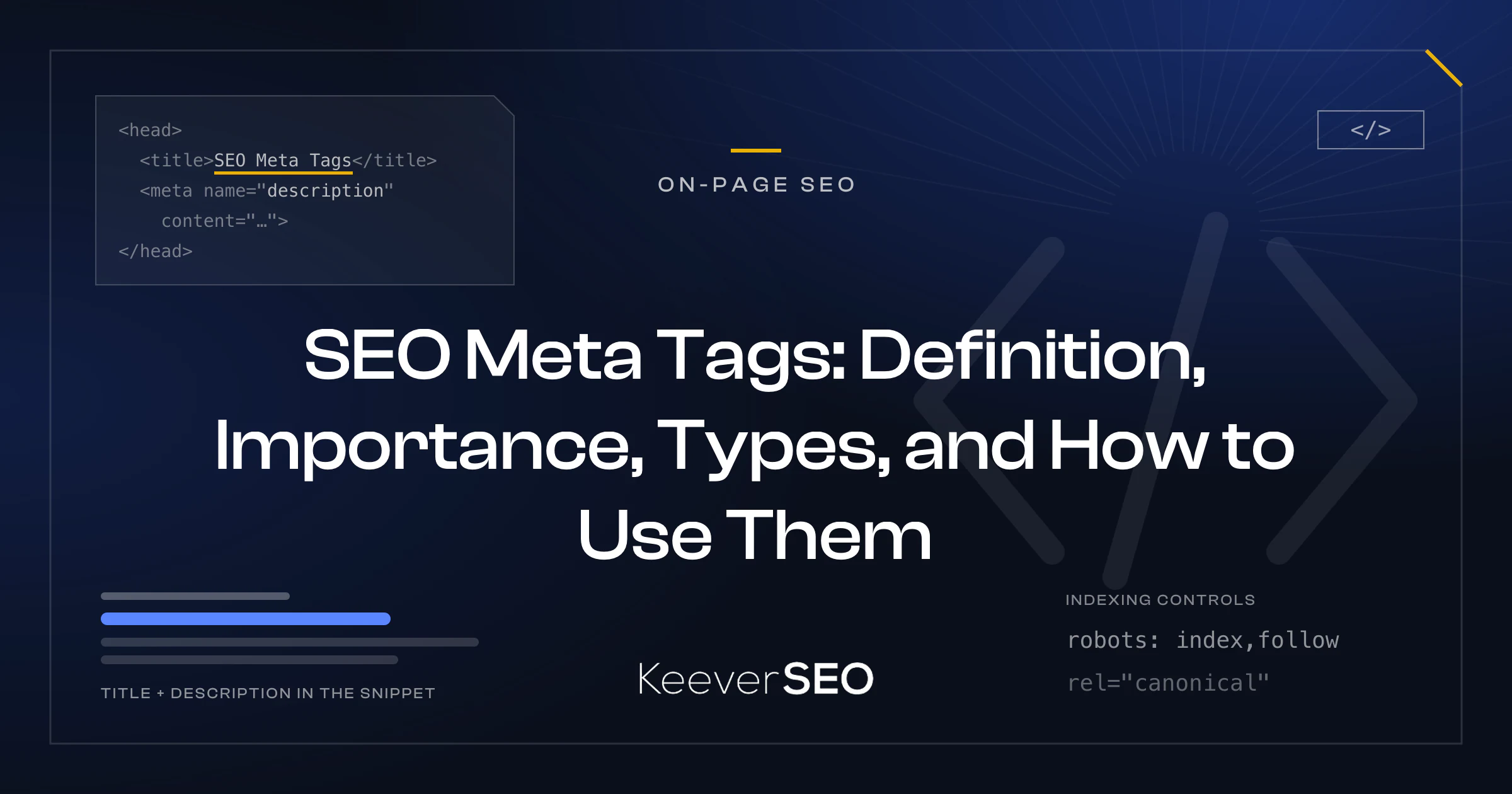
SEO meta tags are HTML elements placed within a webpage's <head> section that give search engines the information they need about the page's content and purpose. The tags stay invisible to users while telling engines how the page should be indexed and displayed in results, with the <title> tag, <meta> elements like description and robots directives, and <link rel="canonical"> references carrying the core work.
The tags divide their labor: the title tag carries light ranking weight and anchors the search snippet, the meta description drives click-through rate (CTR) by summarizing the page's value, robots and canonical tags manage indexing and duplication so signals consolidate on the preferred version, viewport and charset metadata keep mobile rendering and character encoding correct, and Open Graph and Twitter Card tags shape the social preview.
Every indexable page needs SEO meta tags, from single-page sites to sprawling e-commerce catalogs. Proper usage runs through a defined sequence: define the page's intent and target query, write a distinct title tag and a relevant meta description, add robots and canonical directives only where needed, include viewport and charset metadata, append social metadata on shareable content, validate the HTML <head> before publishing to catch duplicates and truncation, and review indexing and search appearance in Google Search Console after crawling.
A strong title tag front-loads the primary keyword, stays near 50-60 characters or 600 pixels to survive truncation, and aligns with the H1 and the intent. A strong meta description works the target query in naturally, uses active, benefit-led language, and closes with a clear call to action. The mistakes to avoid: duplicate or missing titles and descriptions, over-length truncation, keyword stuffing, absent charset or viewport tags, and misused nofollow or noindex on pages meant to rank. Reviews come due when organic traffic or CTR drops, content changes, or seasonal campaigns launch, and the metrics that justify updates include falling impressions or clicks on priority queries and Google repeatedly rewriting the titles or descriptions.
What Are SEO Meta Tags?
SEO meta tags are HTML tags placed in a webpage's <head> section that give search engines information about the page. The tags stay invisible to users while remaining machine-readable, the signals engines use to understand, index, and display the page in results and share previews. The key examples: the <meta> tag carrying descriptions and robots directives, the <title> tag defining the page's headline in results, and the <link rel="canonical"> tag naming the preferred URL among duplicates.
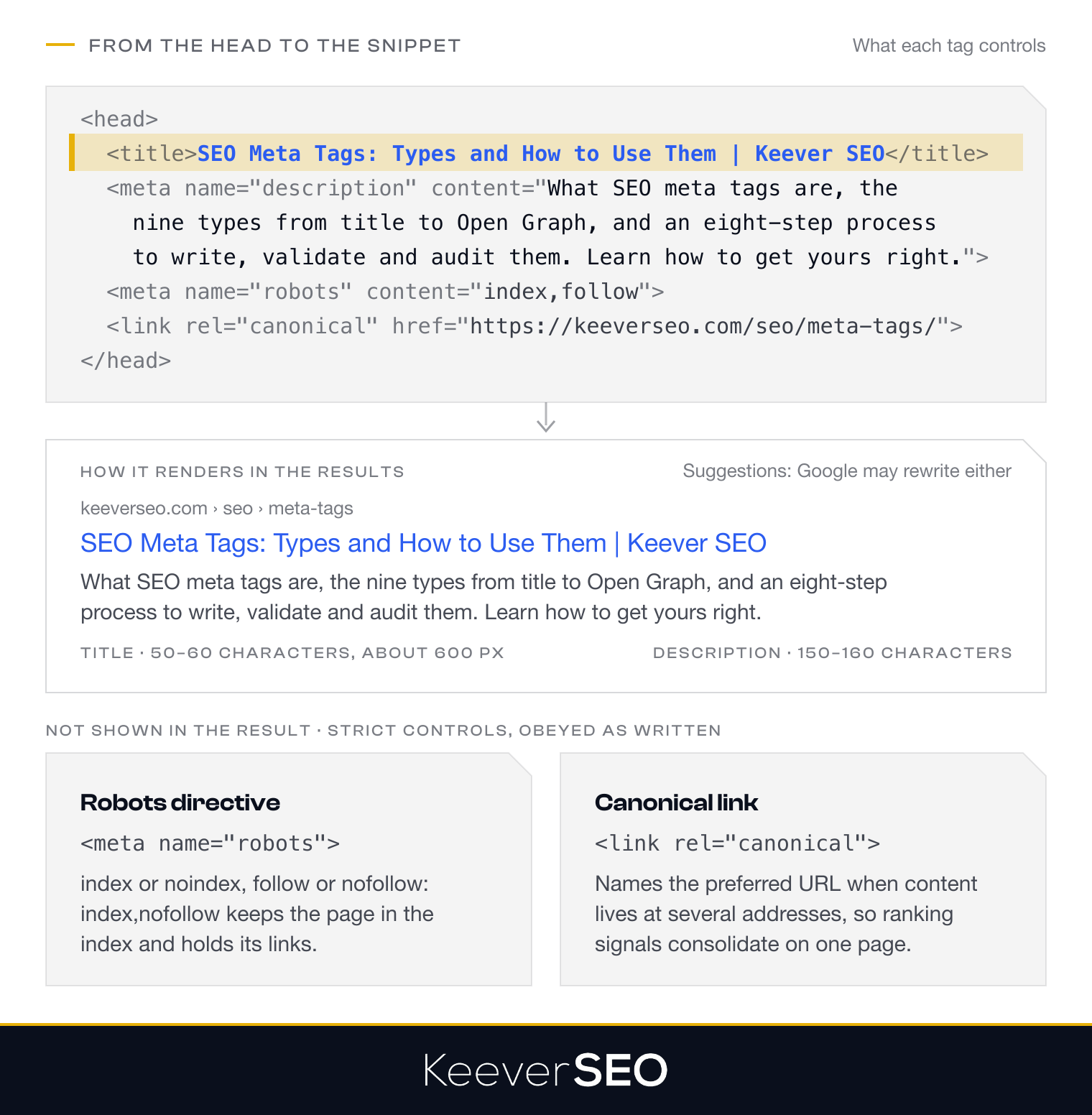
Search engines parse the tags to extract the metadata behind indexing decisions, SERP display, and crawling behavior. The title works as a lightweight ranking signal, the meta description moves click-through by shaping the snippet, and the canonical tag prevents duplicate-content trouble by naming the version that counts. Placement and function together make meta tags the entry point of on-page optimization, precise information delivered where engines read first.
How Do SEO Meta Tags Work?
SEO meta tags work by being parsed and interpreted by search engine crawlers on every visit. The tags sit in the HTML <head> and carry machine-readable signals about content, indexing instructions, and display preferences, with <title>, <meta name="description">, <meta name="robots">, and <link rel="canonical"> the supported set engines process.
Unsupported and irrelevant tags get ignored, and the supported set splits by authority: robots and canonical work as strict controls, while the title and description work as suggestions. Google reserves the right to rewrite a title or build a snippet from the page's visible content whenever the rewrite serves the query better, the flexibility that keeps result previews matched to intent even when the declared metadata falls short.
What Types of SEO Meta Tags Exist?
The types of SEO meta tags are detailed in the table below.
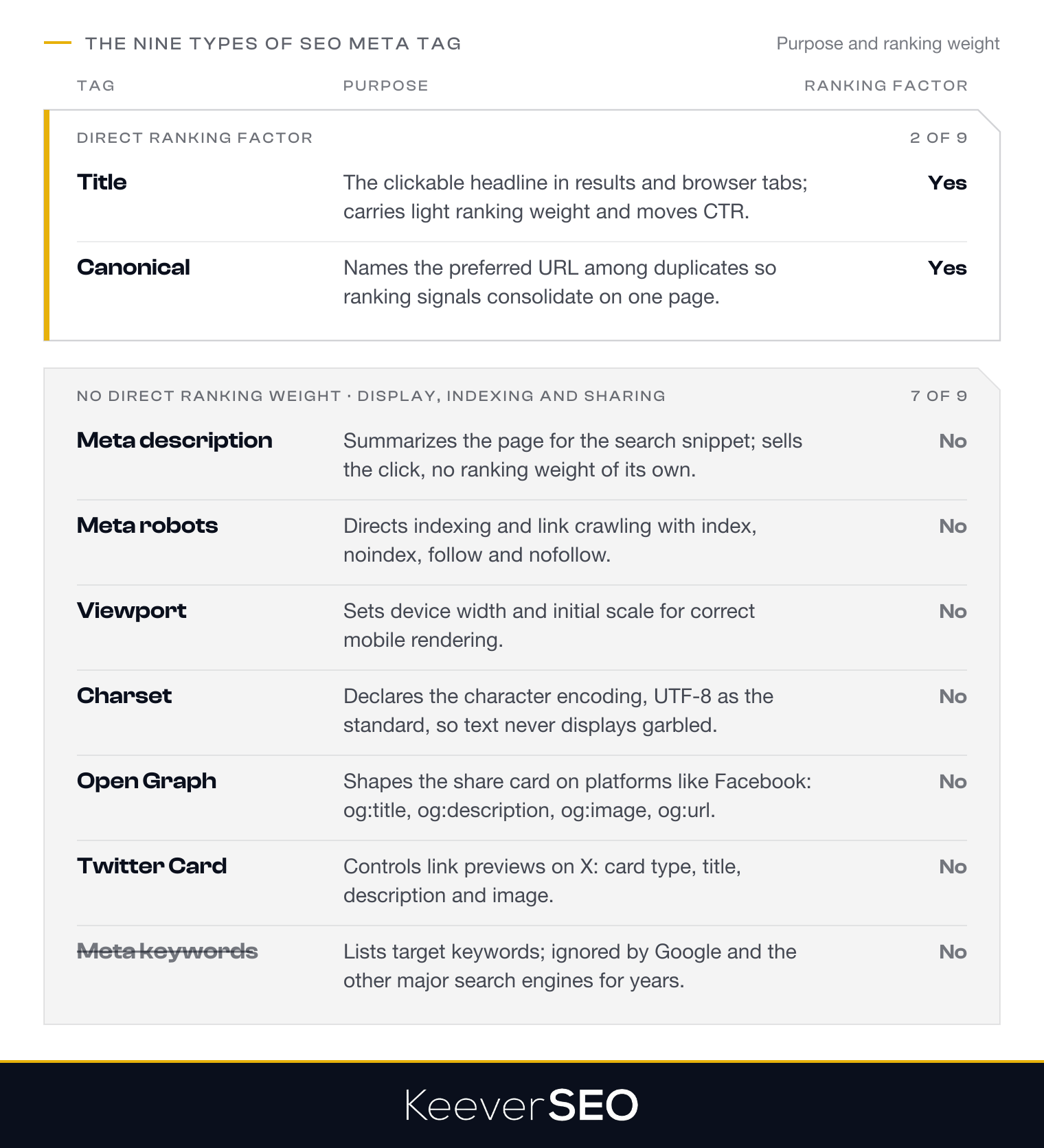
| Tag | Purpose | Ranking Factor (Yes/No) |
|---|---|---|
| Title | Defines the page's clickable headline in results and browser tabs; moves CTR | Yes |
| Meta Description | Summarizes page content for search snippets; moves click-through | No |
| Meta Robots | Directs indexing and crawling through directives like noindex | No |
| Canonical | Names the preferred URL among duplicates, consolidating ranking signals | Yes |
| Viewport | Sets device width and scale for proper mobile rendering | No |
| Charset | Declares character encoding, UTF-8 as standard, for correct text display | No |
| Open Graph | Shapes how content appears when shared on platforms like Facebook | No |
| Twitter Card | Controls Twitter link previews: title, description, and image | No |
| Meta Keywords | Lists target keywords; ignored by modern search engines | No |
The direct ranking weight varies tag by tag, while the set together shapes how the page presents in search and social contexts, visibility and engagement from the same markup.
Why Do SEO Meta Tags Matter?
SEO meta tags matter because they help search engines read page content, control indexation, and shape search appearance. The title tag works as a light ranking signal, adding relevance context, while the meta description, no ranking factor itself, drives click-through by selling the page in the snippet; Moz's "Title Tag" guide documents the title's role in giving engines and users the page's topic at a glance. Meta keywords sit at the other end, once an SEO staple, now ignored by Google and the other major engines. Meta tags handled well produce cleaner indexing, sharper snippets, and stronger engagement from the same search positions.
Who Needs SEO Meta Tags?
Every indexable webpage needs SEO meta tags, whatever the site's size or industry. The tags tell search engines what each page contains and how to present it, from a small business homepage to a large e-commerce catalog.
The pages where meta tags matter most: product pages, where distinct tags separate similar items in search; blog posts, where compelling descriptions earn the click; landing pages, where tags sharpen the targeting for their queries; and category pages, where organized metadata aids indexing and navigation.
The benefit runs universal: meta tags work as informational signals for engines and persuasive previews for users, controlling the search appearance that click-through and engagement follow. Even pages meant to stay out of the index, thank-you pages among them, use robots directives to say so, and a site with its metadata configured end to end runs its whole SEO strategy on cleaner signals.
How Should You Use SEO Meta Tags?
You should use SEO meta tags by three core principles: uniqueness per page, alignment with content and intent, and restraint on keywords. Each page carries distinct tags reflecting its own content, so engines can tell the pages apart; the tags stay true to the page's topic without misleading anyone; and keyword loading stays out, since stuffed tags draw penalties and manual rewrites that cost credibility.
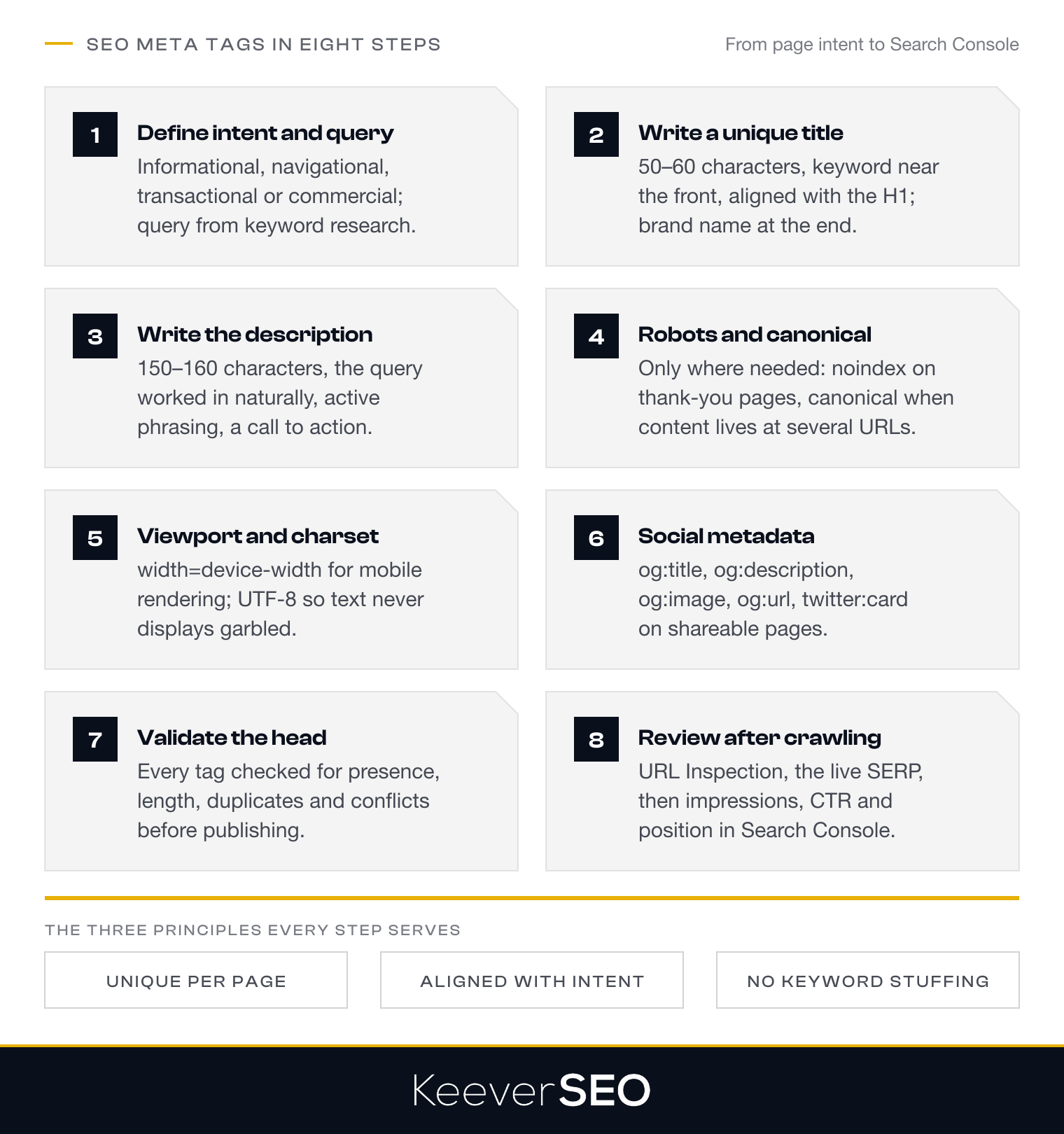
The principles convert into a working sequence that starts at the foundation, defining the page's intent and target query, and builds every tag from there.
1. Define the Page Intent and Target Query
Defining the page intent and target query grounds every tag that follows. The intent read comes first: informational pages deliver knowledge, navigational pages route users to a known brand or a particular page, transactional pages complete purchases, and commercial-investigation pages support comparison before a decision.
The target query comes from keyword research: the terms the audience actually uses, checked against the live results to see what ranks, and against the page's own content to confirm the intent gets fully served. Intent and query defined together keep the metadata precise, no vague, mismatched, or stuffed tags, and the title and description then get written to express them.
2. Write a Unique Title Tag
Writing a unique title tag gives each page its search headline. The title runs about 50-60 characters, inside the display limit that keeps it whole on the results page, with the primary keyword near the front for relevance and clarity, and no two pages share one, since duplicate titles blur the site's pages together.
The title aligns with the page's H1 and its intent, keeping the promise in the snippet consistent with the page behind it. The brand name can close the title after a pipe or dash, the homepage and high-visibility pages first, brand recognition added without crowding the keyword and intent that lead.
3. Write a Relevant Meta Description
Writing a relevant meta description gives the title its supporting pitch. The description runs about 150-160 characters, the range that survives display, and follows four rules: work the target query in naturally, so relevance reads at a glance; phrase the value actively, what the reader gains from clicking; keep every description distinct, one per page; and close with a light call to action, "Learn," "Discover," "Explore," the nudge that converts the impression. Built this way, the description backs the title and lifts the page's visibility into clicks.
4. Add Robots and Canonical Directives Only When Needed
Adding robots and canonical directives only when needed keeps indexing control precise. The robots meta tag instructs engines on indexing and link crawling: index allows, noindex blocks, follow permits link crawling, nofollow stops it, so <meta name="robots" content="index,nofollow"> indexes the page while holding its links. The directive belongs on the pages with a reason for it, thank-you pages and internal search results carrying noindex, never on pages meant to rank.
Canonical tags handle duplication: <link rel="canonical" href="URL"> names the preferred version when content lives at multiple URLs, consolidating the signals onto one page. The tag earns its place on product pages with URL parameters and on syndicated content, always pointing at an indexable URL that truly represents the content, so the engines rank the version the site intends.
5. Add Viewport and Charset Metadata
Adding viewport and charset metadata keeps the page rendering correctly on every device. The viewport tag carries mobile responsiveness: <meta name="viewport" content="width=device-width, initial-scale=1.0"> matches the page width to the device screen at full initial zoom, the configuration mobile-friendly design depends on across screen sizes.
The charset tag sets the character encoding, <meta charset="UTF-8"> as the standard, covering the characters and symbols of every language and keeping text from rendering garbled. Neither tag moves rankings directly, and both are load-bearing for the user experience, which is why they belong in every <head> before the social layer gets added.
6. Add Social Metadata for Shareable Pages
Adding social metadata to shareable pages controls how the content appears in social feeds, through Open Graph and Twitter Card tags governing the headline, summary, image, and URL of the share card:
- og:title: the headline in the social preview, written to reflect the page and earn the tap.
- og:description: the short summary under the headline, the informative layer of the card.
- og:image: the image beside the text, the visual weight of the preview.
- og:url: the canonical URL behind the card, keeping every share pointed at one source.
- twitter:card: the card type, summary or summary with large image, setting the layout on X (previously Twitter).
Cards built from complete tags arrive attractive and informative, and the clicks and engagement they draw feed the site alongside everything search delivers.
7. Validate the HTML Head Before Publishing
Validating the HTML <head> before publishing catches the errors search engines would otherwise find first. The inspection covers the rendered <head> as browsers and crawlers see it, through developer tools or crawling software, checking every tag, title, description, robots, canonical, viewport, charset, and social, for presence, format, and completeness.
The checklist: titles inside roughly 600 pixels (about 50-60 characters), descriptions inside 150-160 characters, robots directives formatted correctly, canonicals pointing at the intended URLs, viewport and charset declared, and Open Graph and Twitter Card values correct with image URLs that resolve. Validation before publication stops implementation errors, conflicting directives, and technical oversights from ever reaching the index, and with the <head> confirmed clean, the attention moves to how the engines actually process it.
8. Review Indexing and Search Appearance After Crawling
Reviewing indexing and search appearance after crawling closes the metadata loop. The review confirms the engines crawled and indexed the page and displays it as intended.
Google Search Console's URL Inspection Tool opens the check, confirming index status and showing how Google read the tags from the <head>, with any gap between the published metadata and Google's display, rewritten titles, regenerated snippets, flagging content and tags that need better alignment with the query.
The live check follows: search the target query, or use the "site:" operator, and compare the shown title and description against the intended ones. Impressions, click-through rates, and average position in the Search Console Performance report then measure the metadata's work over time, the ongoing review that keeps the optimization cycle honest.
How Do You Write a Title Tag?
You write a title tag by the rules listed below:
- Ensure uniqueness: one distinct title per page, so engines can tell the site's pages apart.
- Hold the length: 50 to 60 characters, roughly 600 pixels, the display range Moz's "Title Tag" guide documents as the truncation-safe zone.
- Place the keyword up front: the primary keyword near the front for relevance and visibility.
- Align with the content: the title matching the H1 and the page's intent, snippet and page telling one story.
- Add the brand with restraint: the brand name at the end where it helps, never crowding the topic.
- Skip over-optimization: no keyword stuffing, no vague titles like "Home" or "Untitled."
Google's own guidance calls for descriptive, concise titles, and reserves the right to rewrite any title when a better match for the query exists, the standing incentive to write titles worth keeping.
How Do You Write a Meta Description?
You write a meta description by the steps listed below:
- Length: 150-160 characters, the range that displays whole across devices, in line with Google's snippet documentation "How to Write Meta Descriptions," even as Google occasionally shows longer snippets.
- Target query: the primary keyword worked in naturally, where it can bold in results and confirm relevance.
- Active phrasing: benefit-led language stating what the visitor gains.
- Uniqueness: one distinct description per page, no duplicates to blur the site.
- Call to action: a light prompt where it fits, "Learn more," "Discover," "Find out."
Descriptions built to the steps back the title tag's work and convert impressions into visits.
How Do You Audit SEO Meta Tags?
You audit SEO meta tags through the systematic checks listed below:
- Crawl the entire site: extract every title, description, robots directive, and canonical with an SEO crawler.
- Identify missing tags: find the indexable pages lacking titles or descriptions.
- Find duplicate titles and descriptions: resolve the duplication that blurs pages together and splits ranking potential.
- Check tag length and truncation: titles near 50-60 characters, descriptions near 150-160, nothing cut off in results.
- Review robots and canonical directives: no stray noindex on important pages, canonicals pointing at the right URLs.
- Validate viewport and charset metadata: mobile rendering tags and UTF-8 encoding present everywhere.
- Inspect social metadata: Open Graph and Twitter Card values correct on shareable pages.
- Check for keyword stuffing: no unnatural repetition, tags aligned with actual content and intent.
- Use Google Search Console: the URL Inspection Tool comparing the live indexed version against the intended markup.
- Compare metadata against search appearance: rewrites by Google flagged as relevance or length problems to fix.
The audit run end to end keeps the metadata layer working and the search appearance under the site's control.
What Are Common SEO Meta Tag Mistakes?
The common SEO meta tag mistakes are listed below:
- Duplicate titles or descriptions: identical tags across pages blur them together and dilute relevance.
- Missing titles or descriptions: absent tags force engines to generate their own snippets, rarely the compelling ones.
- Over-length truncation: titles past 55-60 characters and descriptions past 150-165 get cut mid-message.
- Keyword stuffing: overloaded tags read as spam, cost readability, and invite penalties.
- Missing charset declaration: no
<meta charset="UTF-8">risks garbled text for users and engines alike. - Wrong or missing viewport tag: without the viewport declaration, mobile rendering breaks and mobile performance follows.
- Relying on meta keywords: the
<meta name="keywords">tag has been ignored by major engines for years. - Misused nofollow directive: a stray robots nofollow blocks internal links, cutting crawl efficiency and equity flow.
A metadata layer clear of the eight mistakes lets the tags do their real work, visibility and engagement.
When Should Businesses Review SEO Meta Tags?
Businesses should review SEO meta tags when the triggers fire: performance drops in rankings, click-through rates, or impressions; content updates or shifts in page intent that leave the tags describing an older page; and seasonal pages whose metadata must track current campaigns and inventory.
A proactive cadence backs the triggers, quarterly or biannual audits that keep metadata hygiene ahead of site growth, tags staying distinct, intent-aligned, and free of duplication and truncation, with the standing routine doubling as the fast-response system when performance metrics move suddenly.
Which Performance Changes Justify Metadata Updates?
The performance changes that justify metadata updates are listed below:
- Decline in click-through rate (CTR): falling CTR on stable rankings marks metadata out of step with searcher intent.
- Reduction in impressions: shrinking impressions signal reduced visibility or weakening previews.
- Ranking position drops: slipping positions on target queries can reflect metadata misaligned with Google's read of intent.
- Increased bounce rate: rising bounce from search traffic marks a gap between the metadata's promise and the page.
- Frequent metadata rewrites by Google: repeated rewrites in results mean the declared tags are not representing the page.
- Seasonal traffic shifts: changing seasonal behavior calls for metadata tuned to the moment.
- Content updates: a new primary topic, keyword, or intent after a content change demands matching metadata.
Should Seasonal Pages Use Seasonal Metadata?
Yes, seasonal pages should use seasonal metadata. Time-sensitive keywords and phrases in the title and description align the page with the current event or offer, lifting click-through through the peak, and on evergreen seasonal URLs the refresh runs each season while the URL holds, preserving the indexing signals as the metadata tracks current intent.
How Can Teams Measure SEO Meta Tag Performance?
Teams can measure SEO meta tag performance through Google Search Console's impressions, clicks, click-through rate (CTR), and average position, the metrics that show how well titles and descriptions earn attention in results. Impressions count appearances, clicks count selections, CTR converts the two into a rate, and average position supplies the ranking context behind it.
The measurement discipline: track the metrics over time, compare before and after each metadata change, and attribute the movement to the update that caused it. Segmenting by page, query, and device isolates the tags that work from the tags that need another pass, keeping the metadata tuned to intent and behavior, and the exact metrics that read click performance deserve naming.
Which Search Console Metrics Show Metadata Click Performance?
The Search Console metrics that show metadata click performance are listed below:
- Click-through rate (CTR): the share of viewers who clicked the result, the direct read on how compelling the metadata is.
- Total clicks: the raw count of visits the metadata earned from results.
- Total impressions: the appearances that set the baseline the clicks get measured against.
- Average position: the ranking context, since CTR expectations shift with position.
- Query-level CTR: the per-query breakdown exposing which searches respond strongest to the metadata.
Can CTR Changes Indicate Metadata Improvements?
Yes, CTR changes can indicate metadata improvements. Titles and descriptions rewritten for relevance and pull tend to lift click-through from the same positions, the signal that the new metadata lands with searchers. Google's documentation "How to Write Meta Descriptions" confirms the mechanism, with the meta description shaping the search snippet that drives click behavior, and First Page Sage's click-through research supplies the baseline: position sets CTR expectations, so a rate rising above its position's norm marks the metadata doing extra work.
When Should a Business Hire an SEO Agency for Meta Tag Management?
A business should hire an SEO agency for meta tag management when scale, technical depth, or internal capacity runs out. Sites carrying hundreds or thousands of pages outgrow manual metadata upkeep, demanding the systematic auditing, templating, and standing review small teams cannot staff, and the technical layer, duplicate URLs, canonical directives, mobile and social metadata, rewards professional handling. Our SEO team brings the tools, processes, and experience for site-wide audits, gap and duplicate detection, and scalable fixes, keeping the metadata aligned with the wider technical SEO and content strategy.
When Do Large Websites Need Professional Meta Tag Support?
Large websites need professional meta tag support at the scale where manual management stops working, hundreds or thousands of pages in practice. At that size, distinct optimized titles and descriptions per page demand systematic auditing and automation past most in-house capacity, and we supply the tooling and workflows: metadata managed at scale, duplicates and gaps flagged, tags kept current with shifting intent and content.
What Should an SEO Agency Audit Across a Website?
An SEO agency should audit the areas listed below across a website:
- Title tag uniqueness and quality: one descriptive title per page, under 60 characters, keywords front-loaded, no duplication.
- Meta description presence and relevance: a distinct, compelling 150-160 character description per page, target query and call to action included.
- Robots directives correctness: no accidental noindex on important pages, nofollow applied deliberately.
- Canonical tag implementation: canonicals pointing at the preferred versions, indexing conflicts prevented.
- Viewport and charset metadata: mobile rendering and UTF-8 encoding declared everywhere.
- Social metadata completeness: Open Graph and Twitter Card markup complete on shareable pages.
- Meta keywords removal: the obsolete tag cleared from the
<head>. - Truncation and over-length issues: titles past ~600 pixels and descriptions past 160 characters flagged.
- Keyword stuffing patterns: repetitive keyword use in tags caught before it costs quality or clicks.
- Missing tags: pages without titles, descriptions, or charset declarations identified.
- Indexation control alignment: robots directives, canonicals, and XML sitemap entries agreeing per page type.
- Header tag hierarchy and structure: H1, H2, and H3 usage forming a logical content hierarchy.
- Duplicate content indicators: near-duplicate pages exposed through canonical and tag analysis, marked for consolidation or differentiation.
- Seasonal and outdated metadata: time-sensitive pages whose stale tags no longer match content, promotions, or intent.
How Do SEO Meta Tags Support Ongoing Content Optimisation?
SEO meta tags support ongoing content optimisation as the adjustable layer between the page and the results page. As content evolves, revised titles and descriptions keep the search presentation aligned with the current focus and intent, and the working routine reviews underperforming pages, retunes their tags toward current queries, and watches impressions, click-through, and position for the response.
The iteration makes metadata a low-friction testing mechanism: click-through performance tuned without touching the core content, tags tracking keyword trends, seasonal demand, and competitive messaging as they move. Google Search Console measures each change's effect, keeping every page's metadata current as the content and the search environment shift around it.
How Do SEO Meta Tags Support Mobile and Social Visibility?
SEO meta tags support mobile and social visibility through the rendering and preview layers. The viewport tag, <meta name="viewport" content="width=device-width, initial-scale=1.0">, carries mobile-friendly design, fitting the page to each screen and preventing the rendering failures that cost users and rankings together.
On the social side, Open Graph and Twitter Card tags govern the share preview, og:title, og:description, og:image, and og:url for Open Graph, twitter:card for X, defining what users see when the content travels. The social tags move no rankings directly, and they earn their keep anyway: compelling previews draw engagement, engagement drives visits, and the added traffic and potential backlinks feed the SEO loop from outside it.
Why Should Businesses Maintain Unique SEO Meta Tags?
Businesses should maintain unique SEO meta tags because distinct tags are what let search engines tell the site's pages apart. One set of tags per page sharpens indexing accuracy and visibility, avoids the duplication that confuses engines, and lifts ranking precision and click-through together, each page announcing its own value and relevance.
Distinct tags carry the internal differentiation across page types, product pages against blog posts against category hubs, each signaling its purpose without metadata conflicts eroding the site's search performance. Distinct textual signals per page are how a site gets ranked for what each page actually is.
How Do Unique Meta Tags Help Search Engines Understand Page Differences?
Unique meta tags help search engines understand page differences by giving every page its own declared identity. A distinct title and description per page state that page's content, purpose, and target topic, so engines index each accurately and match it to the right queries. The practice completes what SEO meta tags fundamentally are, the HTML statements in the <head> carrying precise information about each individual page, and pages that state themselves precisely get found precisely.